The portal
The local web portal inside the Semlith binary. Stores, search, the code graph, agents, the ledger, reports and settings, with screenshots.
semlith start serves a web page on this machine. It shows the same index your
agents query over MCP and semlith search reads in a terminal: what is indexed,
what a question returns, what the code graph knows, which agents are connected,
and what was recorded about it. This document covers every page, control and
figure; Concepts at the end defines the terms.
Every screenshot here is from a clean install indexing BurntSushi/ripgrep, with real agent sessions in the ledger. Every byte the page loads is compiled into the binary — no CDN, no build step — so it works with the network unplugged.
Starting it
semlith startThe daemon binds 127.0.0.1 only; there is no flag to change that. The default
port is 7365 (SEML on a phone keypad); --port or SEMLITH_PORT moves it. The
URL is printed once, on stdout:
http://127.0.0.1:7365/?token=<the session token>Ctrl-C stops the daemon: watchers stop, the vector index is checkpointed, write
locks are released, and the discovery file semlith mcp reads is removed last.
With the login service running (semlith setup installs it), semlith start
prints the running daemon’s URL and exits.
Access rules
Opening the URL hands the token to the page, which keeps it in session storage and
removes it from the address bar at once, so it stays out of history and
bookmarks. From then on it travels as a Semlith-Token request header. It is
not a cookie on purpose: every port on localhost is the same site to a browser,
so a cookie set here would reach any other local page. Nothing sets or reads a
cookie.
| Rule, checked in this order | When it fails |
|---|---|
Host is localhost, 127.0.0.1 or ::1 | 400, before anything else runs |
A write carries a JSON content type and, where the browser sends fetch metadata, Sec-Fetch-Site: same-origin | 403, empty body |
/api/* needs the session token; /mcp needs the agent key as a bearer | 401, empty body, after a delay |
The page, its stylesheet, script, fonts and icons are the only credential-free
responses. Every response carries Content-Security-Policy: default-src 'self'
with style-src 'self' and no unsafe-inline, and no CORS header is sent. That
is why the page has no inline style attribute (it would be dropped silently):
data-driven sizes go through the CSSOM, and tests/portal.rs fails on an inline
style.
The shell
Everything except Welcome and the store wizard sits in one frame: a header, the navigation on the left, and the page.
Navigation
Each store also has a page of its own. Stores carries a
badge with the files waiting for a review decision; Agents shows ! while no
agent client is registered. Badges count only what is waiting for you.
Every route is a URL fragment, so any tab can be bookmarked or reloaded:
| Fragment | Opens |
|---|---|
#/home (or empty) | Home |
#/stores, #/stores/inside | Stores: All stores, Inside the index |
#/store/<name>, …/files, …/review, …/runs, …/settings | A store’s page and its tabs |
#/search | Search |
#/graph, #/graph/blast, #/graph/path | Graph: Explore, Blast radius, Path & evidence |
#/agents, #/agents/add, #/agents/tools, #/agents/health | Agents: Connected, Add a client, Tools, Health |
#/ledger, #/ledger/retrievals, #/ledger/replay | Ledger: Sessions, Retrievals, Session replay |
#/reports, #/privacy | Reports, Privacy |
#/settings, …/access, …/cloud, …/about | Settings: Performance, Agent access, Cloud, About |
#/welcome, #/new | Welcome, the store wizard |
Layout follows the frame’s width, not the device: from 1100 px the navigation is open; from 760 to 1100 px it is a 56 px icon rail with tooltips and badges; under 760 px it is an overlay from the menu button.
The daemon card at the foot of the navigation gives the address, that the
daemon is the sole writer, how many stores are open and agents connected, and
whether the ledger is recording. If the daemon stops answering, a line under the
header says so and names semlith start; the page reconnects by itself.
Header
The menu button, the logo (to Home), the breadcrumb, and — while anything
indexes — the run pill (Indexing api · 42%, or Waiting for review in
amber), which opens that store’s Runs tab. On the right: Ask the index a
question (also / from anywhere outside a text field), New store, and the
theme control — light, dark or system, kept in local storage; system follows
prefers-color-scheme live.
Shared behaviour
- Tables sort by a heading, page with a pager, and choose rows per page. With checkboxes, the heading box selects the page and a bar offers every row the filter matches, naming the count first.
- Tooltips show label/value rows and the whole of any truncated cell.
- Confirmations name what is about to happen and to what; Escape closes them and any open menu. Toasts say what an action did.
- Loading animations are shown exactly while a screen’s first fetches are
pending. A cached page draws at once and refreshes behind the scenes. With
prefers-reduced-motionnothing moves.
Live updates
The daemon keeps one counter per data domain — stores, runs, clients, ledger,
events, privacy — and bumps it wherever that domain is written. The page polls the
six integers once a second (GET /api/changes) and refetches only the domains
that moved; a background tab stops polling and catches up when it returns. It is
a poll, not a stream, because a stream would hold one of the daemon’s eight HTTP
workers per open tab. Search, Graph and Reports never redraw on their own: each is
the answer to a question someone asked.
Welcome
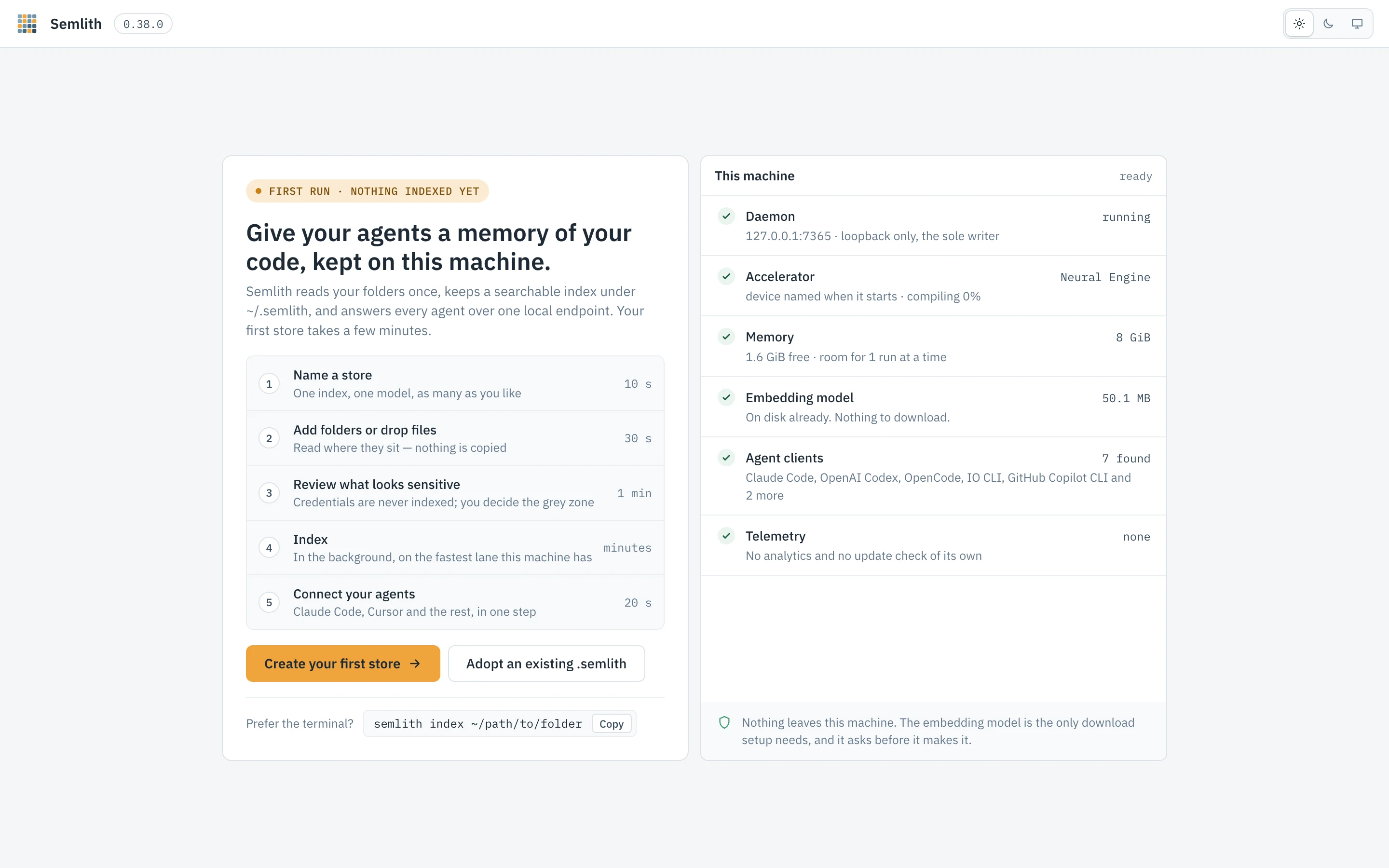
Shown in place of the shell while the daemon has no store, and again from
Settings › About (Open the first-run screen) or #/welcome. Agents, Privacy
and Settings stay reachable without a store.
The left side lists the wizard’s steps and offers Create your first store
(the wizard, ending with Connect) and Adopt an existing .semlith (a folder
picker confined to your home, with folders that already hold a store marked; the
choice is registered and opened without re-embedding). Under them is a copyable
semlith index ~/path/to/folder.
This machine, on the right, is read from the daemon:
| Check | Shows |
|---|---|
| Daemon | The address, loopback only, sole writer. |
| Accelerator | The lane that will embed — Neural Engine, GPU or CPU — and its state (ready, compiling, downloading with a percentage). |
| Memory | Total and free memory, and how many runs at once that allows. |
| Embedding model | Whether it is cached; if not, that it downloads once at the first run (or, under airgap, that the cache must be pre-seeded). |
| Agent clients | The clients found on this machine. None is not a fault. |
| Telemetry | None: no analytics, no update check of its own. |
The model download is the only thing semlith fetches on its own; starting the first run is your agreement to it.
The store wizard
Makes a store, fills it and connects agents, asking before anything sensitive goes in. New store opens it at step 1; a store’s Add sources opens it at step 2 for that store. Steps: Name, Sources, Review, Index, and Connect when started from Welcome. A side panel summarises what each step chose.
Name
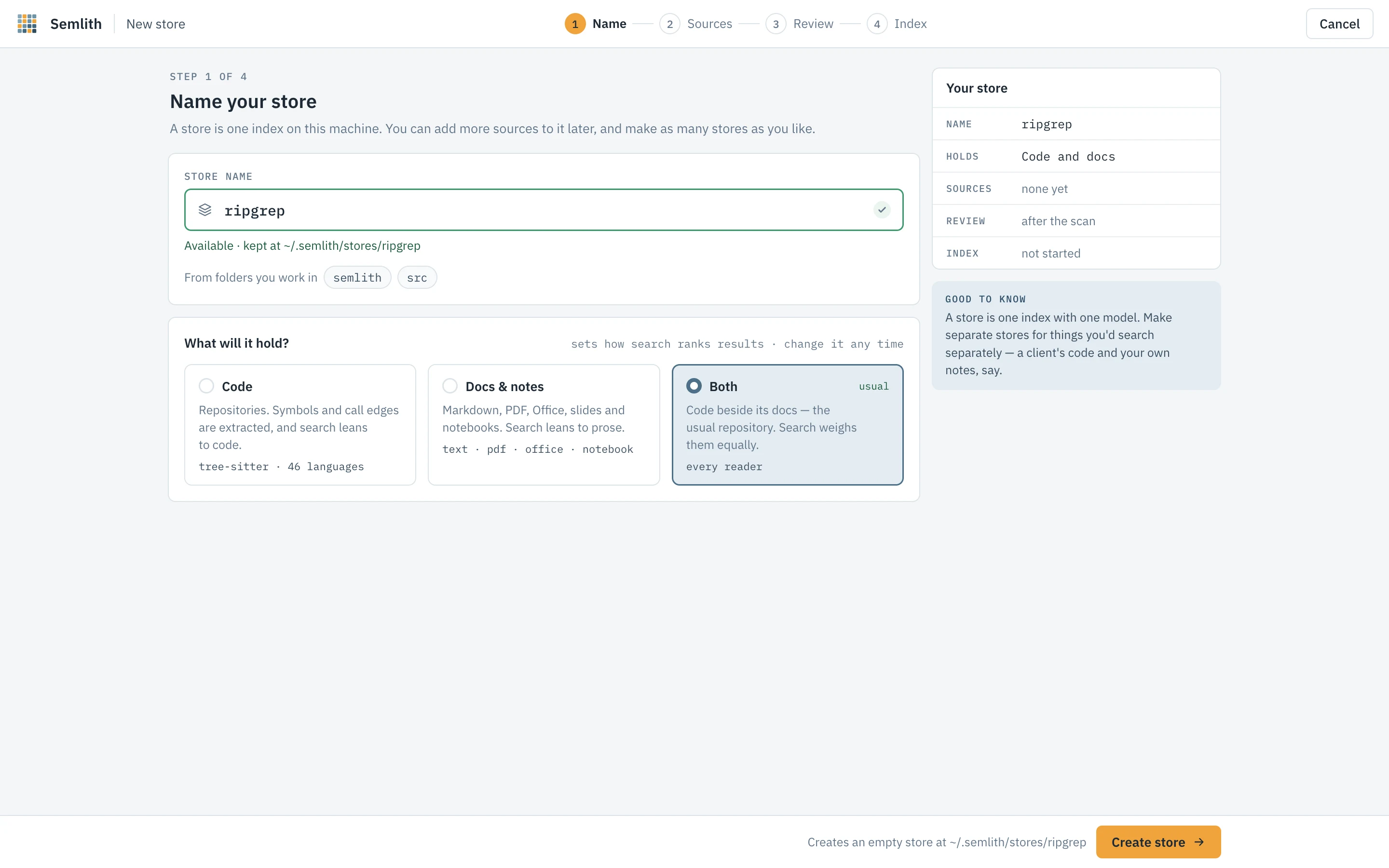
Names are lowercase letters, digits and dashes, starting with a letter or digit,
up to 40 characters; the field says as you type whether the name is free and where
the store will live (~/.semlith/stores/<name>). What will it hold? — Code,
Docs & notes, or Both — sets the store’s default search lean (changeable later on
its Settings tab); it never filters. The embedding model is shown and fixed for
the store’s life, because vectors from two models are not comparable.
Create store creates the store, empty. Leaving the wizard before anything is indexed asks whether to Delete store or Keep it.
Sources
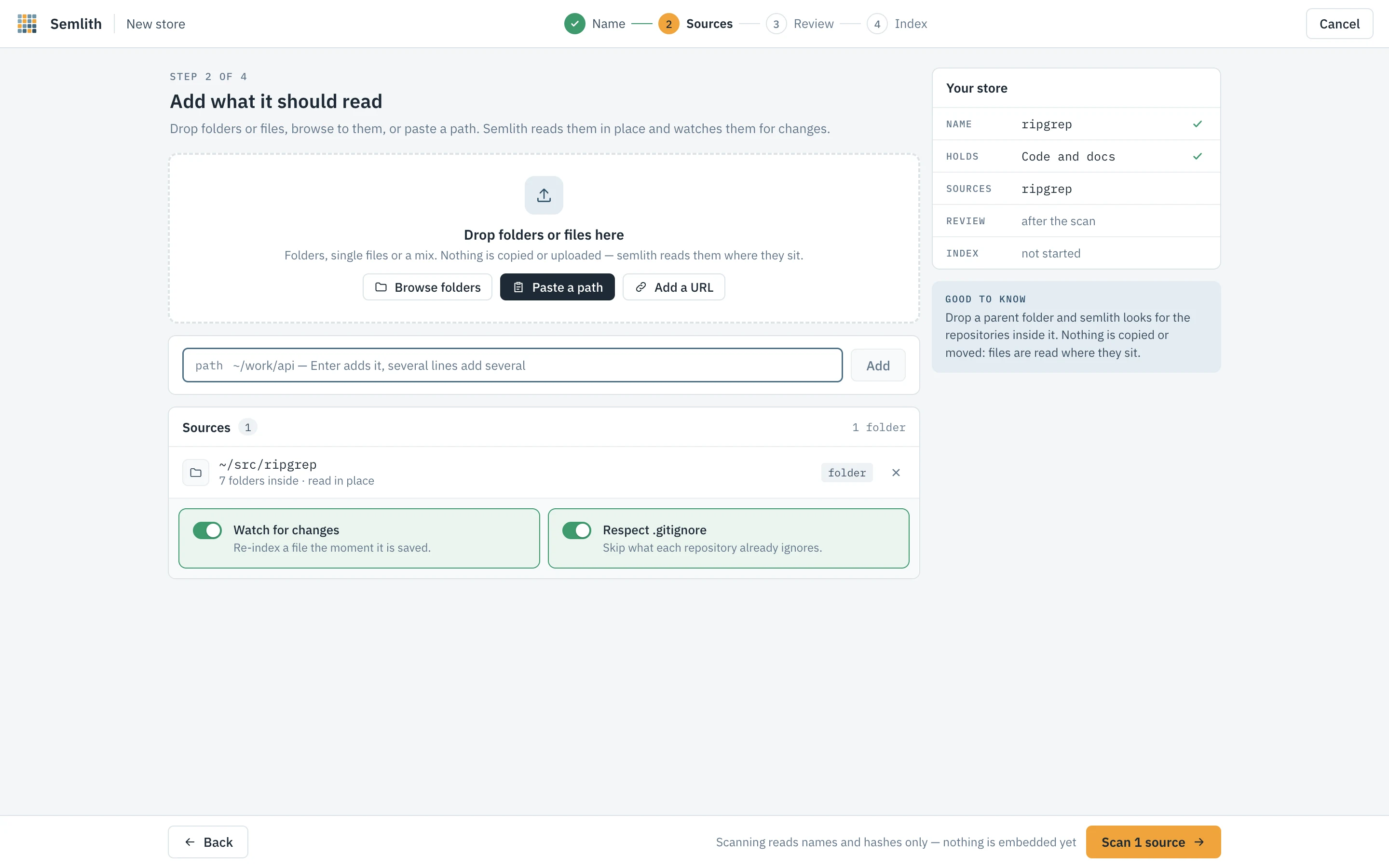
Nothing is copied or uploaded: sources are read where they sit and, with Watch for changes on, re-indexed when saved.
- Drop folders or files on the drop zone (see Drag and drop).
- Browse folders — a picker confined to your home, multi-select, showing which folders other stores already read.
- Paste a path — one per line; quotes are stripped,
file://URLs decoded,~expanded. The portal reads only inside your home folder; a path outside it is refused with the command that indexes it from a terminal,semlith index <path>, which has no such limit. - Add a URL — one https request for exactly that URL (a page, a PDF, a file on GitHub) when the run starts; no crawling, no credentials, kept in the store’s own downloads folder. Refused under airgap.
A folder holding several git repositories (detected as semlith index --projects does) offers Keep together (one store) or One store each (as
--each). Respect .gitignore skips what each repository ignores.
Review
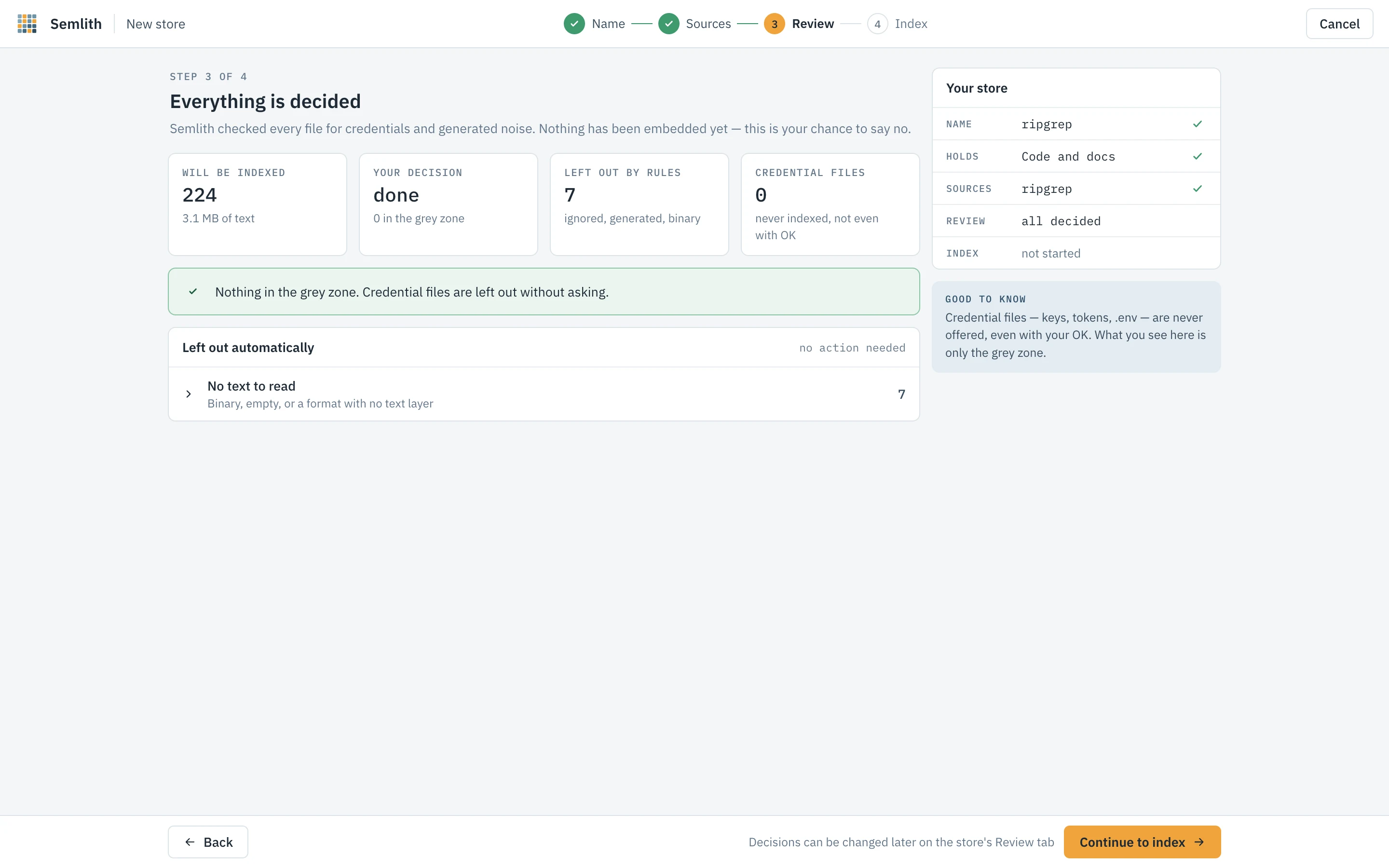
Nothing is embedded here. Scan walks the tree, hashes each file, checks it for credentials and against the rules, then shows the files to index, the text they hold, how many are unchanged (skipped by hash), and an estimated embedding time from this machine’s last measured rate.
Needs your decision is the grey zone: files held back that a person may let in. Each row shows why it was held (a secret-shaped value, or a limit such as the size cap or a generated folder), the risk if indexed as a percentage and band, the likely kind of what matched, masked evidence, and a suggested action. The decisions are Keep out, Redact & index (each detected value becomes a typed placeholder before chunking; it covers only what the scanner detected) and Index. Decide one file at a time or on a selection (filter by view and risk, Select all shown); Apply suggestions to N undecided takes every suggestion and Undo reverses the last decision. Every decision is logged per file as yours. An agent can never make one: the route refuses any caller that is not a person on this page.
Left out automatically groups what needs no decision: ignored files and
hidden files (every dotfile and dot-folder the hidden rule skipped, named, so the
counts add up to the files on disk), build output, lockfiles, oversize files,
files with no text — each saying why where the reader can tell: binary, not
UTF-8 text, encrypted, or an archive past the 32 MiB budget — and credential
files.
Credential files — keys, tokens, .env — are never offered, even with your
agreement. Undecided files stay out; decisions can be changed later on the store’s
Review tab.
Index
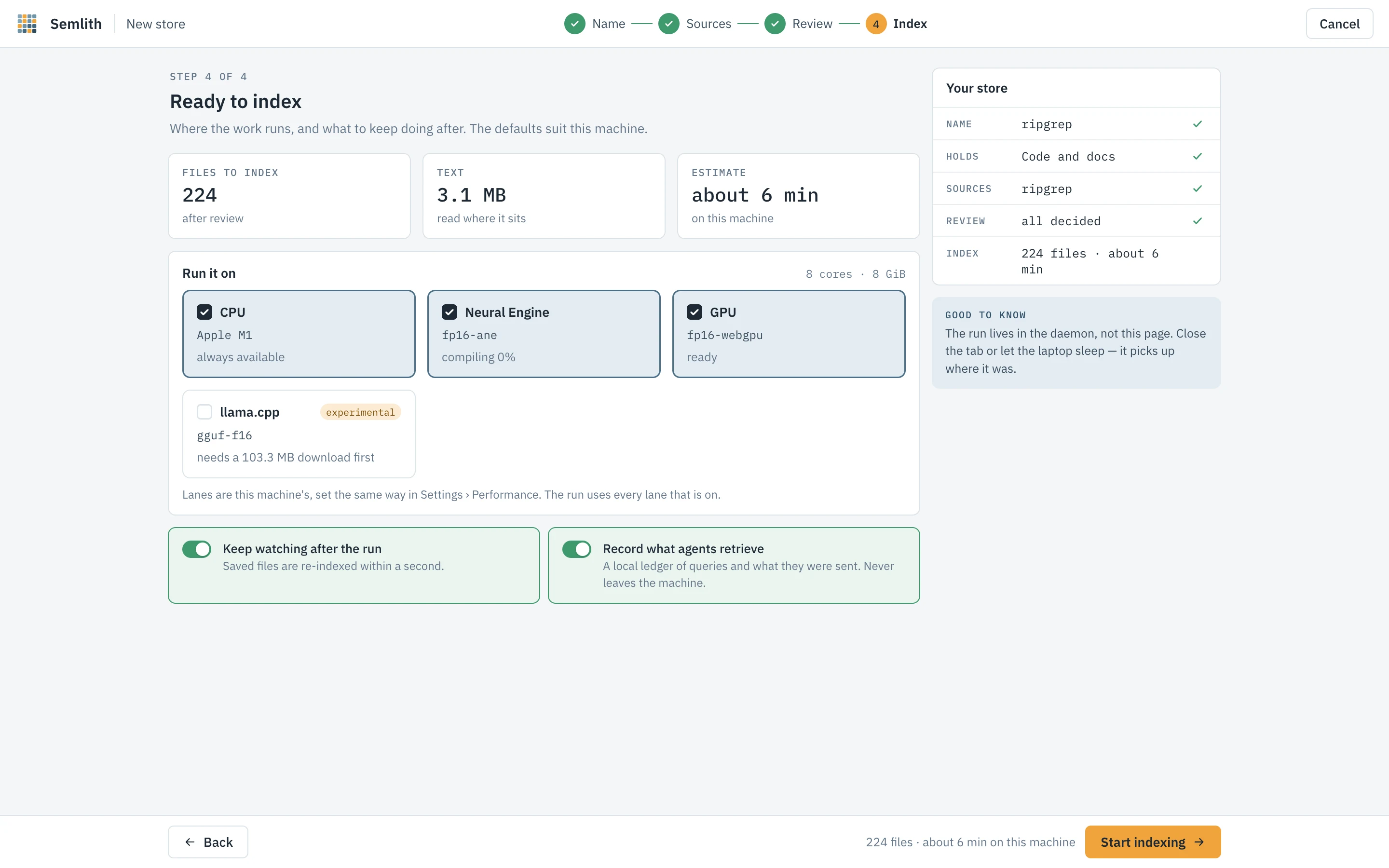
Run it on lists this machine’s embedding lanes with their last measured rates and a switch each — the same switches as Settings › Performance; a lane whose pack is missing asks before downloading it. Keep watching after the run and Record what agents retrieve are this store’s watch and ledger settings. If the model is not on disk, the step names the source and size, and Start indexing is your agreement to that download.
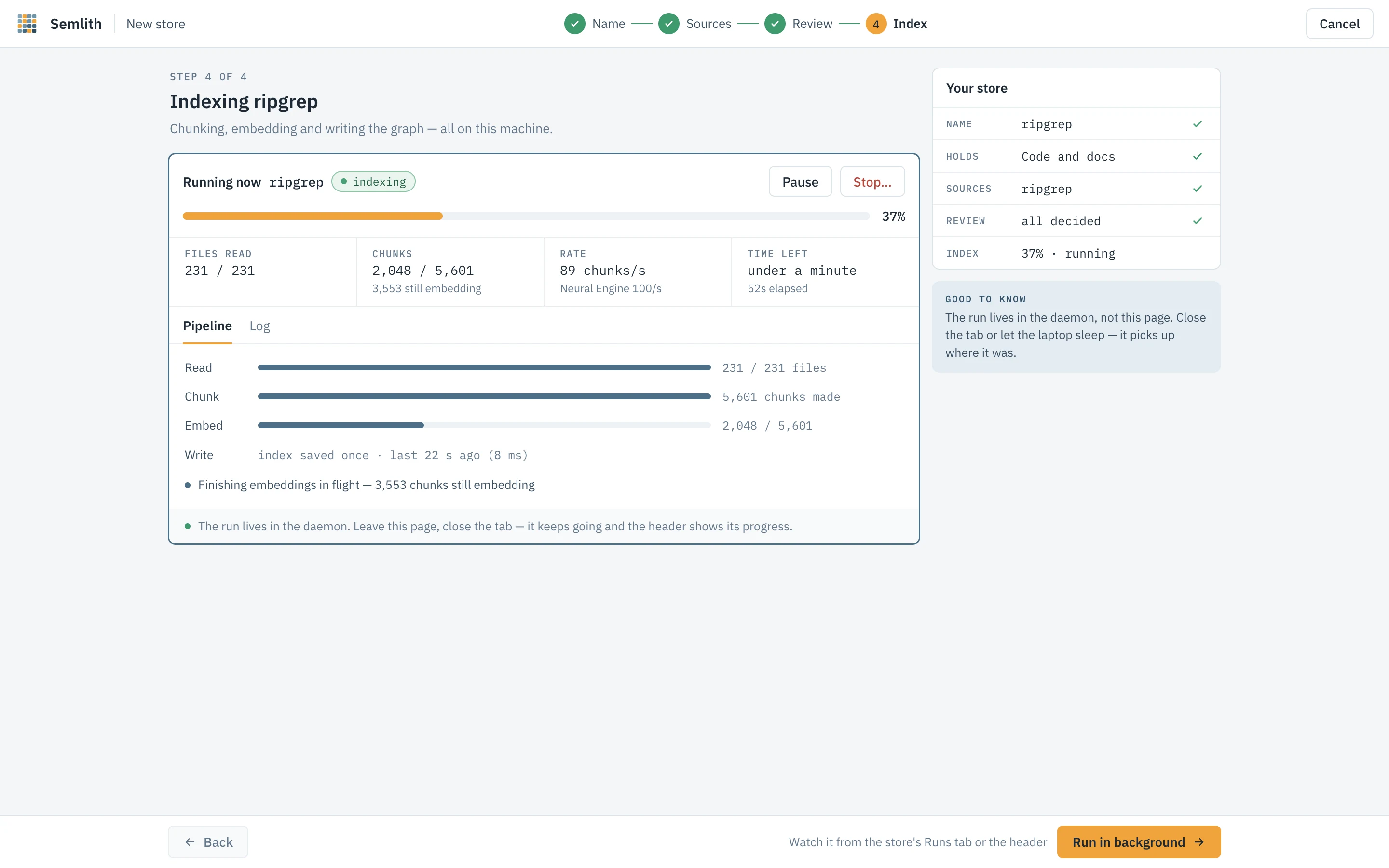
During the run the step shows the stages, files read, chunks, rate, time left and the log, with Pause, Resume and Stop… (see Runs). The run lives in the daemon: close the tab and the header’s run pill still follows it.
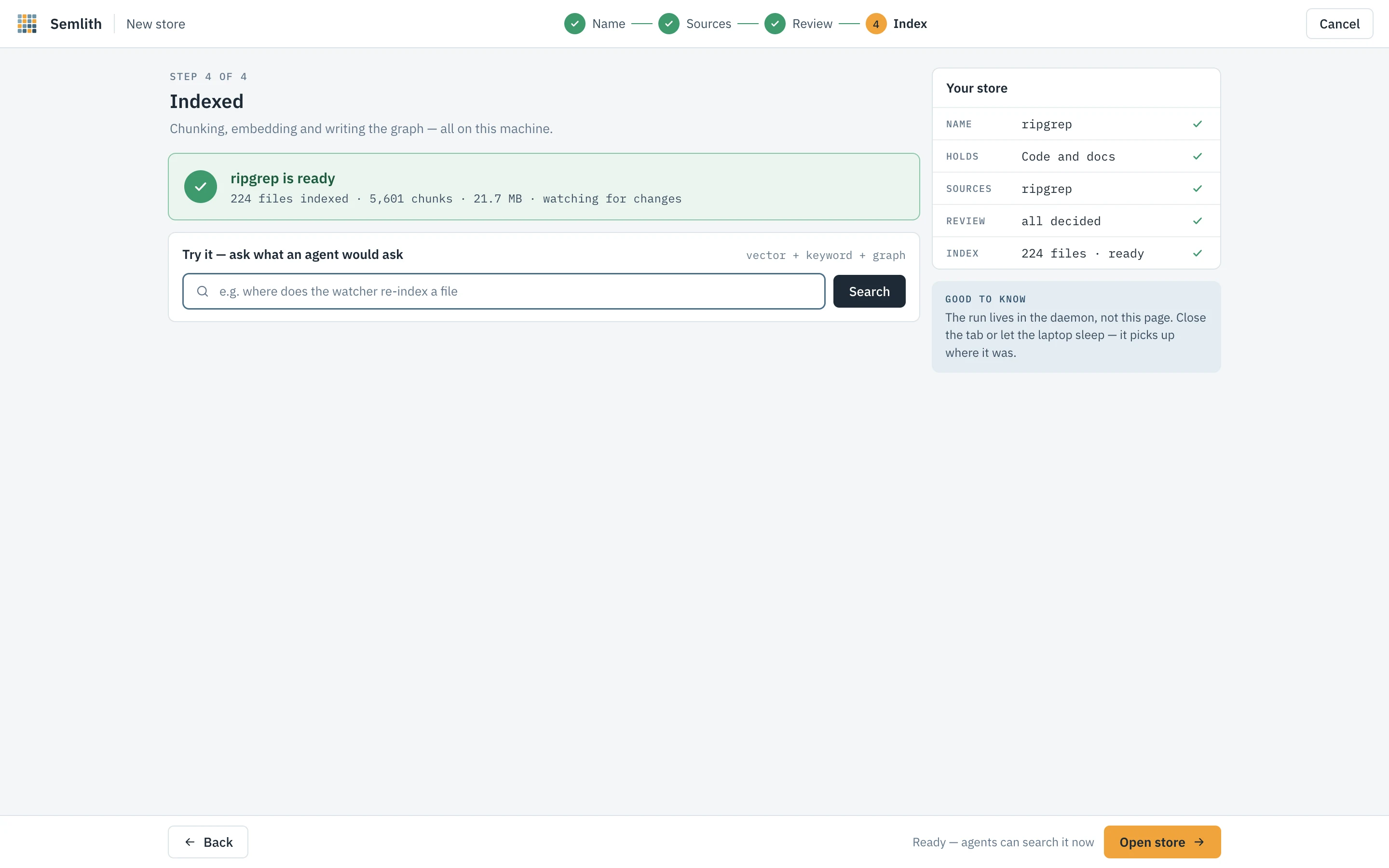
When it finishes, Try it runs a search the way an agent would see it.
Connect
Shown when the wizard started from Welcome: the agent clients found here, which file each registration writes, and that each file is backed up beside itself first. Register writes the selected clients; Set a client up by hand instead shows the configuration to copy. Agents › Add a client does the same any time.
Drag and drop
Browsers never give a page a dropped item’s path, and semlith uploads nothing. The
page sends a description of each item — name, file or folder, size, modification
time, and for a folder its first-level names and up to twenty files’ sizes and
times — to POST /api/drop/resolve, and the daemon finds it on disk, trying in
order: the macOS drag pasteboard (only if it changed for this drag and every name
and kind matches); the selection of open Explorer windows on Windows; the OS file
index (Spotlight, Windows Search, plocate, localsearch or Baloo); existing store
roots and their parents; recently browsed folders; and finally a walk capped at
two seconds.
A match is offered as Add this path? and added only when you confirm; several give a picker; none puts the cursor in the path box with this system’s copy-path shortcut. A path in a temporary folder (an item dragged out of an archive) is refused with a request to extract it first. With the file-manager helpers installed (Settings › About), Finder, Explorer, Nautilus, Dolphin and Thunar offer Index with semlith on a selection.
Home
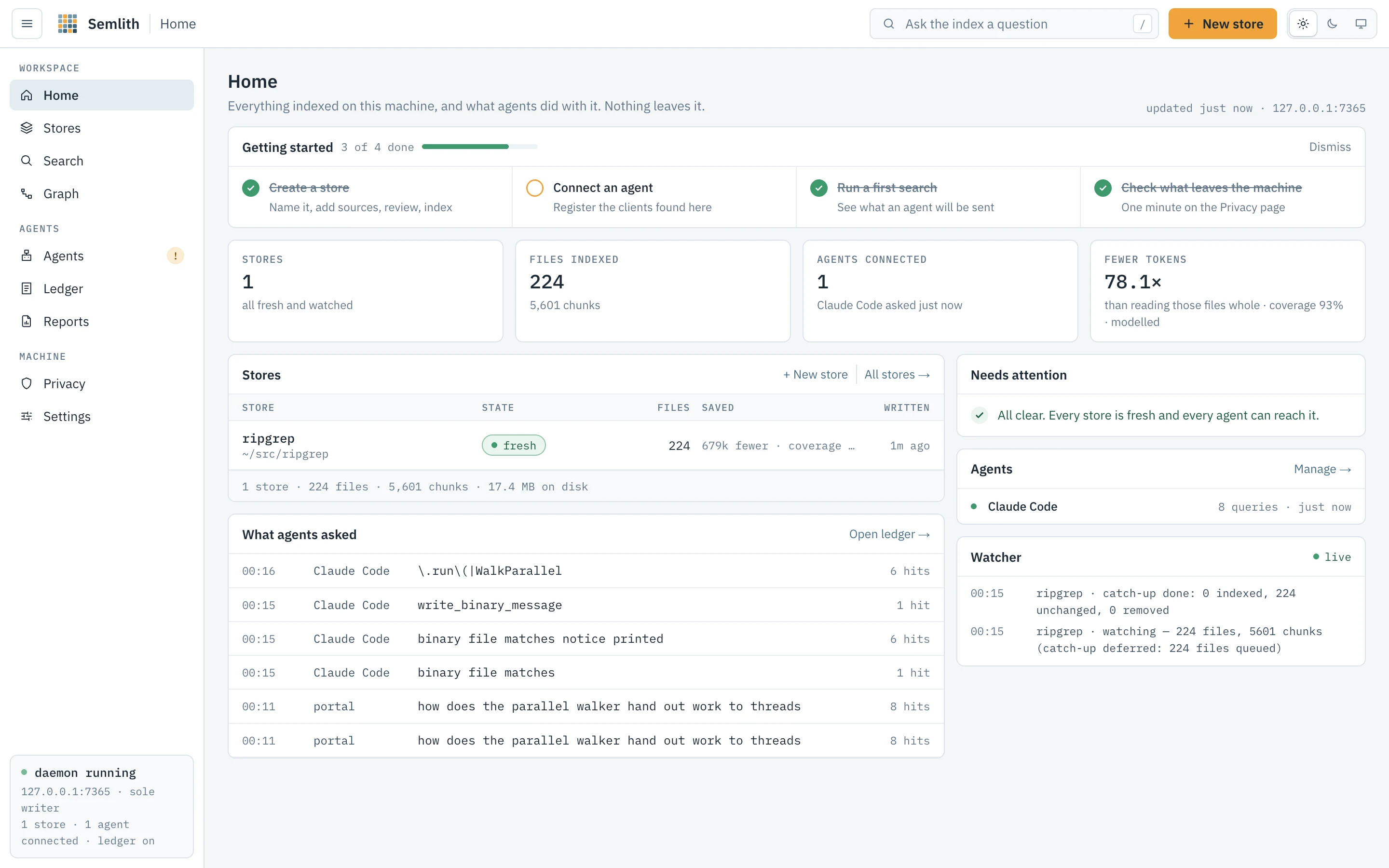
What is indexed, what needs you, which agents are connected and what they asked — each one click from where it is handled.
Getting started is a four-item checklist — create a store, connect an agent, run a first search, check Privacy — that ticks itself from the daemon’s state and can be dismissed.
| Figure | Counts |
|---|---|
| Stores | Stores, and what is going on: runs going, stores needing review, or all fresh and watched. |
| Files indexed | Files across every store, and their chunks. |
| Agents connected | Clients talking to the daemon now, and which agent asked last; otherwise how many are registered or found. |
| Fewer tokens | What agents read against reading those files whole, always with coverage and tier — see Ledger. |
Stores is the store table at a glance. What agents asked lists recent retrievals and says when recording is paused. Needs attention lists what is waiting, each with its button: files held for review, a store whose directory is gone or database did not open, a missing source (Re-point), a ledger chain that does not verify (Inspect), reclaimable space (Compact), no agent registered or connected (Connect), a registered client that cannot reach semlith, and a finished run; otherwise it says all clear. Agents lists the connected clients, and Watcher is a live feed of changes on disk since the daemon started. Every part reads live.
Stores
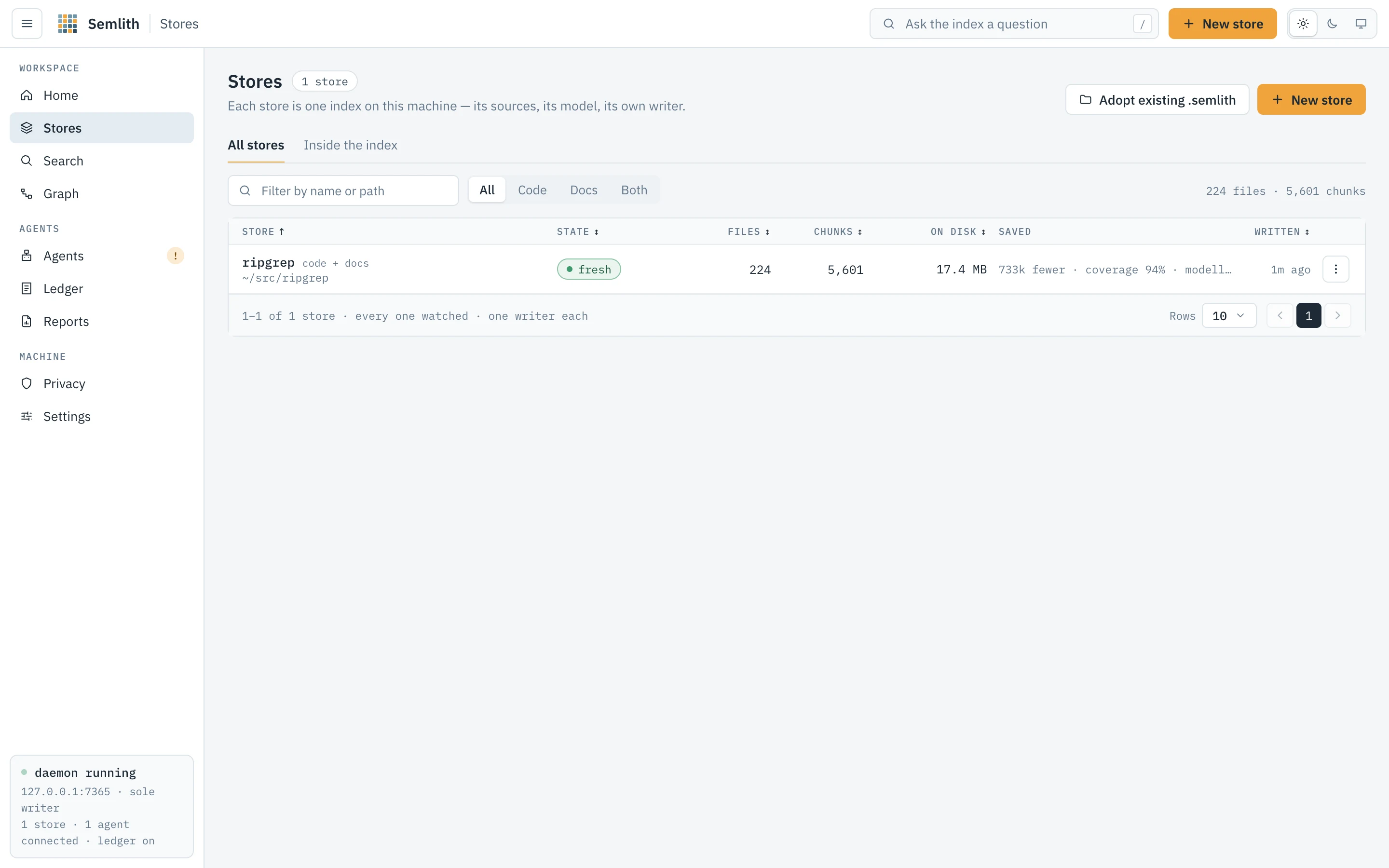
Every store on this machine, what it holds, and whether it is being kept current.
A store is one directory holding a vector index and a SQLite database that
must agree. New stores live in ~/.semlith/stores/<name>; a registry beside them
records each store’s roots, the directories it covers. One store can hold
several roots because a store is a corpus: put directories you want answered in
one ranking into one store, and corpora that should not be ranked against each
other into separate ones.
Two tabs — All stores and Inside the index — and two buttons, Adopt existing .semlith (register a store made elsewhere, without re-embedding) and New store.
All stores
Filter by name or path and by kind (Code, Docs, Both).
| Column | Meaning |
|---|---|
| Store | Name, kind, and what it read. |
| State | See below. |
| Files / Chunks | Files indexed, and the pieces they were cut into. |
| On disk | Size, and how much is reclaimable. |
| Saved | Tokens agents did not read because of this store, with coverage and tier. |
| Written | When the store was last written. |
| State | Meaning |
|---|---|
indexing | A run is going, with its percentage. |
paused | A run is held by Pause. |
N to review | Files are waiting for a person’s decision. |
empty | The store holds nothing. |
not indexed | Sources were added and not yet embedded. |
fresh | Up to date and watched. |
A store whose directory is gone or database cannot be read says so on its row
without affecting others. Every load re-reads the registry, so a store created by
semlith index in another terminal appears here — and answers over MCP —
without a restart.
Row menu: Open, Add sources, Search it, Re-index (skips unchanged files by hash), Compact (rewrites vectors without deleted chunks and vacuums the database; search keeps working; the daemon also compacts idle stores past the threshold in Settings) and Forget… (deletes the index, vectors and ledger rows, never your files; asks first). Compact N compacts every store with something to reclaim.
Inside the index
Measured from the stores on every read: lines of code (comments and blanks separated), words indexed across code, prose, slides, sheets and notebooks, printed pages at 500 words a page, reading time at 250 words a minute, and the language mix with how many languages carry graph edges.
- What is in the prose — PDF pages, slides (
.pptx,.odp), non-empty sheet cells (.xlsx,.ods,.csv,.tsv) and notebook cells, each beside its file count. Counted by each reader in the pass that extracts the text; formats with no such unit are counted in files. - Shape of the code — average line, comment and blank lines, deepest path, longest file.
- Time in the corpus — first read, newest write, median retrieval time, runs remembered.
- What the graph holds — symbols, settled edges, unresolved calls, names defined more than once.
- Chunks added per month, by when semlith read them.
- Graph health — call edges split into extracted, resolved, ambiguous and unresolved (see Confidence), and the most-defined names, which are the ones whose edges become ambiguous.
Each store is measured on its own connection, so measuring a very large store does not hold up the store list or a search. The page reads live and keeps its scroll position.
A store’s page
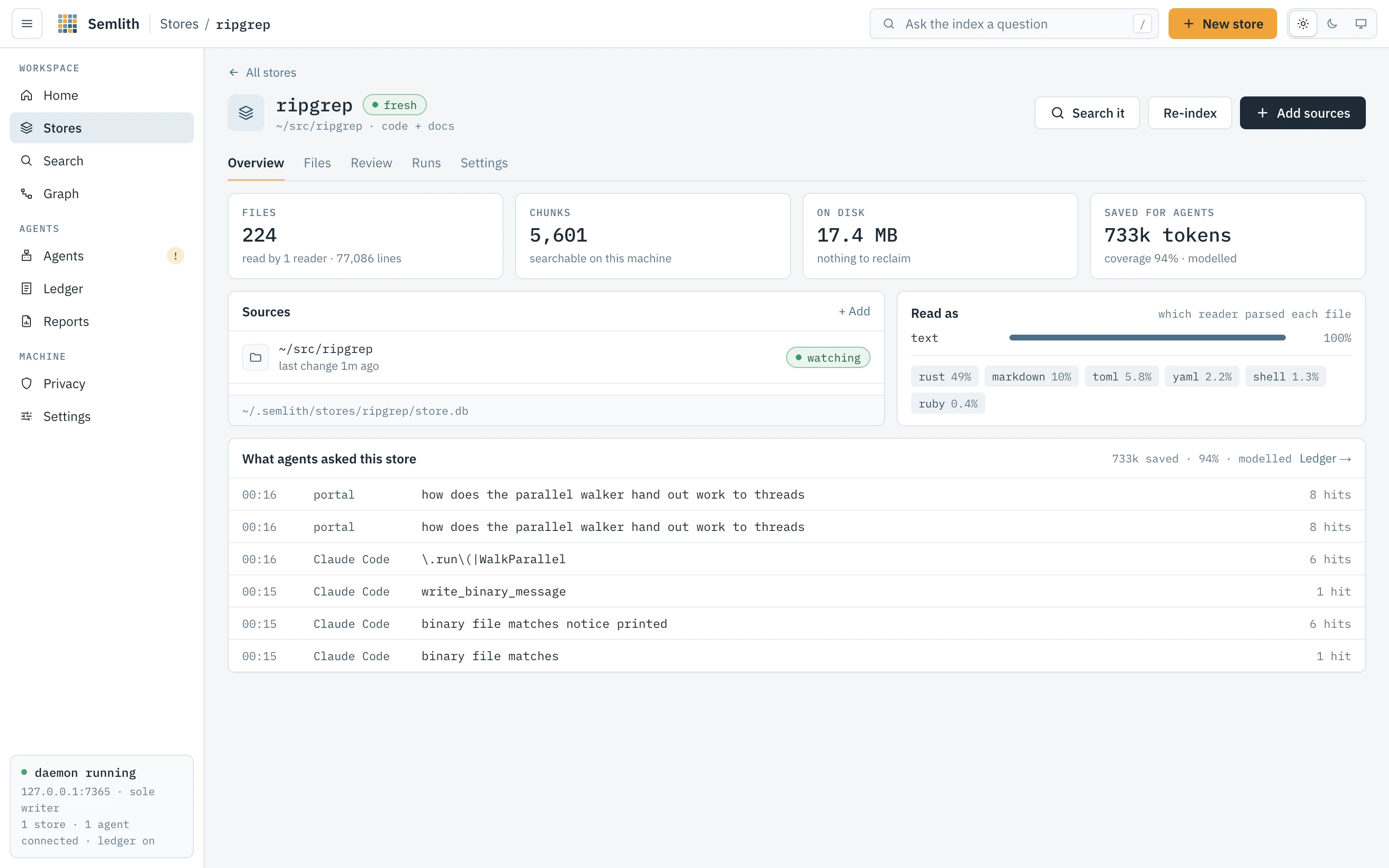
Everything about one store in five tabs — Overview, Files, Review, Runs, Settings — with Search it, Re-index and Add sources in the header. A name that is no longer a store says so.
Overview
Files and the readers that read them, chunks, size on disk and what is reclaimable, and tokens saved for agents with coverage and tier. Sources lists each root with whether it is watched and its last change, and flags a missing one. Read as counts files per reader — PDF, notebooks, HTML, Word, PowerPoint, Excel, OpenDocument, EPUB, RTF, mail and images besides plain text, chosen by extension before the bytes are read — and the language mix. What agents asked this store lists its recent retrievals. An empty store shows how to fill it instead.
Files
Exactly what is in the store, so “not indexed” and “indexed but does not say that”
stop looking the same. Path glob (src/**), type and language filters narrow the
server’s query, so the count is the filter’s. List shows path, reader,
language, lines, chunks and when indexed. Tree is an explorer, one root per
top-level entry, each folder loaded only when opened; files on disk but not in the
store appear greyed with the reason (binary, refused as a secret, credential file,
over the size cap, generated folder, .gitignore, .semlithignore, not indexed
yet). A folder past 1 000 entries lists the first thousand and counts the rest.
This is what semlith files --tree and semlith_files {tree: true} return.
Selected rows can be copied as paths, re-indexed or Forgotten (chunks, vectors and edges dropped; the file is untouched and comes back when it next changes, if watched).
Review
Waiting for your decision is this store’s grey zone, decided exactly as in the wizard’s Review step — singly or on a selection, logged per file as yours, never by an agent. Decisions is the record of every decision in this store, yours and the rules’: its outcome (accepted, redacted and indexed, kept out, read as an image, never indexed) and who made it, filterable by path or reason, outcome, and Yours or Rules. Undoing one of yours takes the file out and holds it again with today’s reasons.
Runs
Running now is the current run with Pause, Resume and Stop…, or Take out of the queue if it has not started. History lists every finished run across restarts: its kind (first index, re-index, watcher catch-up, compact), when, how long, what it indexed, and its stage timings and log.
A run lives in the daemon — id, paths, status, counters, clock, the last 500 log lines and its summary — so navigating away or closing the tab changes nothing. Only its own Stop or the daemon ending cuts it short.
| Status | Meaning |
|---|---|
review | Scanned and held for Start indexing; holds no slot and no writer. |
queued | Waiting: with a place in line, for the daemon-wide queue; without one, for its store’s writer. |
running | A writer has it. |
pausing / paused | Pause pressed; held at the next batch boundary. |
held | Admitted, then held because runs at once was lowered. Held runs resume first, keeping progress. |
stopping | Undoing what the run embedded; on a large corpus this takes as long as the embedding did. |
done / stopped / failed | Finished; stopped and undone; ended on an error that was not a single file’s. |
Figures. Files read, chunks, rate and time left. The rate is chunks over the
last ten seconds of active time (pauses excluded), also shown per lane —
Neural Engine 141/s · cache 722/s, where cache is the vector cache returning
vectors it already holds. The time left is the daemon’s estimate of the embedding
work left over a smoothed rate; until a minute of embedding has been measured it
leans on this machine’s known lane speeds. Between polls the page counts down,
correcting to the daemon’s figure on each one.
Stages say where the time went, as semlith index --verbose prints them —
walk 0.0 s, read+hash 0.2 s, parse+chunk 0.6 s, tokenize 2.5 s, embed wait (ane) 125.3 s, write 11.8 s — and sum to the wall time. While the last embeddings
drain, the line counts the chunks still embedding live.
Log. One line per file — indexed, unchanged, skipped, removed,
refused, failed — with the reason for the last three. A refusal names the rule
or the credential kind and line, never the matched text. The page reads the log by
cursor, so two tabs each see every line once.
Pause holds the run at its next batch, keeping its writer; Resume carries on from the same chunk. Stop rolls back everything the run embedded and says so first; its checkbox also deletes the store (ticked by default only if the store was empty before the run). Take out of the queue removes a run that has embedded nothing.
Watcher catch-ups (picking up what changed while nothing watched) and bursts of more than 32 file events are runs too, queued like any other; a smaller burst is indexed at once, so a saved file reaches search within seconds. The tab reads live and paints in place, keeping the log’s scroll position.
Settings
- Name — rename; agents see the new name on their next call.
- Search leans to — Code, Docs or Neither: the default
preferfor this store; it multiplies, never filters. - Watch for changes — re-index a file the moment it is saved.
- Record retrievals — whether this store’s queries enter the ledger (says so when recording is paused machine-wide).
- Respect .gitignore — on every run and on the watcher.
- Maintenance — Compact now (with the reclaimable size) and Re-index everything.
- Where it reads from — each root; a moved root offers Re-point…, which
changes only the registry entry. A store outside the store home that is not yet
trusted offers Trust, after which plain
semlithcommands find it. - Forget this store — deletes the index and its ledger rows, never your files; asks first.
Search
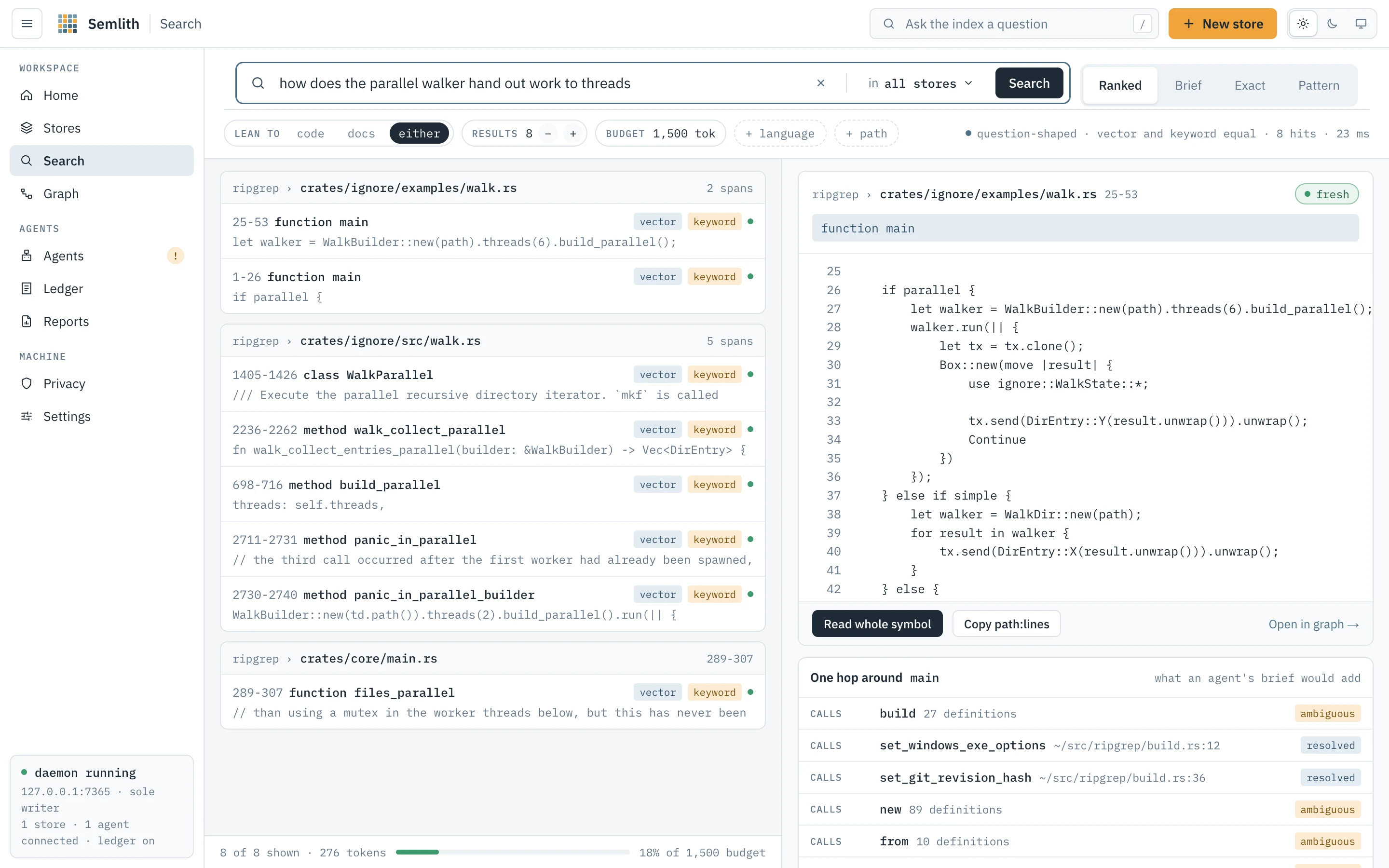
Ask the corpus a question and read the answer the way an agent receives it. The box takes the question; under it are the scope (all stores or one), + language and + path filters, and four modes:
| Mode | Returns the same as |
|---|---|
| Ranked | semlith_search — spans ranked by meaning and words. |
| Brief | semlith_brief. |
| Exact | semlith_search {exact: true} — every matching line, like grep -E. |
| Pattern | semlith_pattern — a tree-sitter query over one language. |
Before a search the page offers four example questions and your recent searches.
With a cloud org connected, a Ranked search that names no store also asks the
org’s stores, and This machine only beside the filters keeps one search
here, as --local and local: true do.
How ranking works
Every ranked query searches two lists over the same corpus. The vector search embeds the question and finds chunks close in meaning, which is how plain words find a paragraph that never uses them. The keyword search runs the terms through a full-text index, which is how an identifier finds the line it is on. A store with images adds a third list, matching your words against pictures through CLIP.
Each list is searched deeper than asked, then the lists are fused by reciprocal
rank: a chunk both lists rank well beats one only a single list liked. The code
graph is not part of ranking; related-but-not-matching code is what Graph’s
neighbours and blast radius are for. Scores order one result set and mean nothing
across two. The line above the results — e.g. identifier-shaped · keyword weighted ×2 — comes from the answer itself: an identifier-shaped query weights the keyword
list twice; a question weights them equally. An identifier query the ranking
answers with nothing falls through to Exact.
| Badge | Meaning |
|---|---|
definition | This chunk defines the name you typed; it is lifted above the ranking (identifier queries only). |
vector | The meaning matched. |
keyword | The words are literally in the text. |
image | The picture matched the words. |
Freshness. Every hit is fresh if its file still has the size and
modification time it had when indexed, stale otherwise — one stat per path,
conservative on purpose (a bare touch reads stale). A stale hit says to re-read
the file before quoting it; the lines shown are what semlith read.
Locators. Each hit is one line: span, enclosing symbol and kind, the lists that found it, freshness, and the line holding most of your words, grouped by file in ranking order. That is the first stage and what an agent gets by default; the span itself is read only for the hit opened, so eight wrong hits cost eight lines, not eight chunks. The footer gives hits shown, their tokens and the share of the budget. A store still embedding says so: keyword covers it meanwhile, vector does not yet.
Dials
| Dial | Effect |
|---|---|
| Scope | All stores, or one. |
| Lean to | code, docs or either; multiplies, never filters. A store searched alone defaults to its own lean. |
| Results | k, 1 to 50; 8 by default. |
| Budget | Tokens one answer may cost: 500, 1000, 1500 (default), 3000 or 6000. |
language, path | Only this language; only paths matching this glob. |
Exact runs the query as a regular expression (or literal text if it is not a
valid one) over the stored text of every indexed file in scope, prose included,
listing each file once with its matching lines and the definition each sits in;
past the limit it says more lines match. Pattern needs a language and captures
every node the query matches, e.g. (call_expression function: (identifier) @f).
Detail panel
Opening a hit shows its span with line numbers from the span’s own first line —
the numbers semlith read prints. Read whole symbol widens to the enclosing
definition (Show the span only narrows back); Copy path:lines copies the
locator; Open in graph → selects the symbol in Graph; One hop around lists
its callers and callees with confidence badges — what a brief would add. An image
hit shows the picture, fetched through the API and handed over as a data: URL
(the policy allows img-src 'self' data:).
Brief shows exactly what semlith_brief returns: the best span in full, one
line per other hit within the budget, and the graph edges it carries. Copy as the
agent sees it copies it as text. When the budget leaves no room for a span’s text,
the locator is still sent and the page says so.
Graph
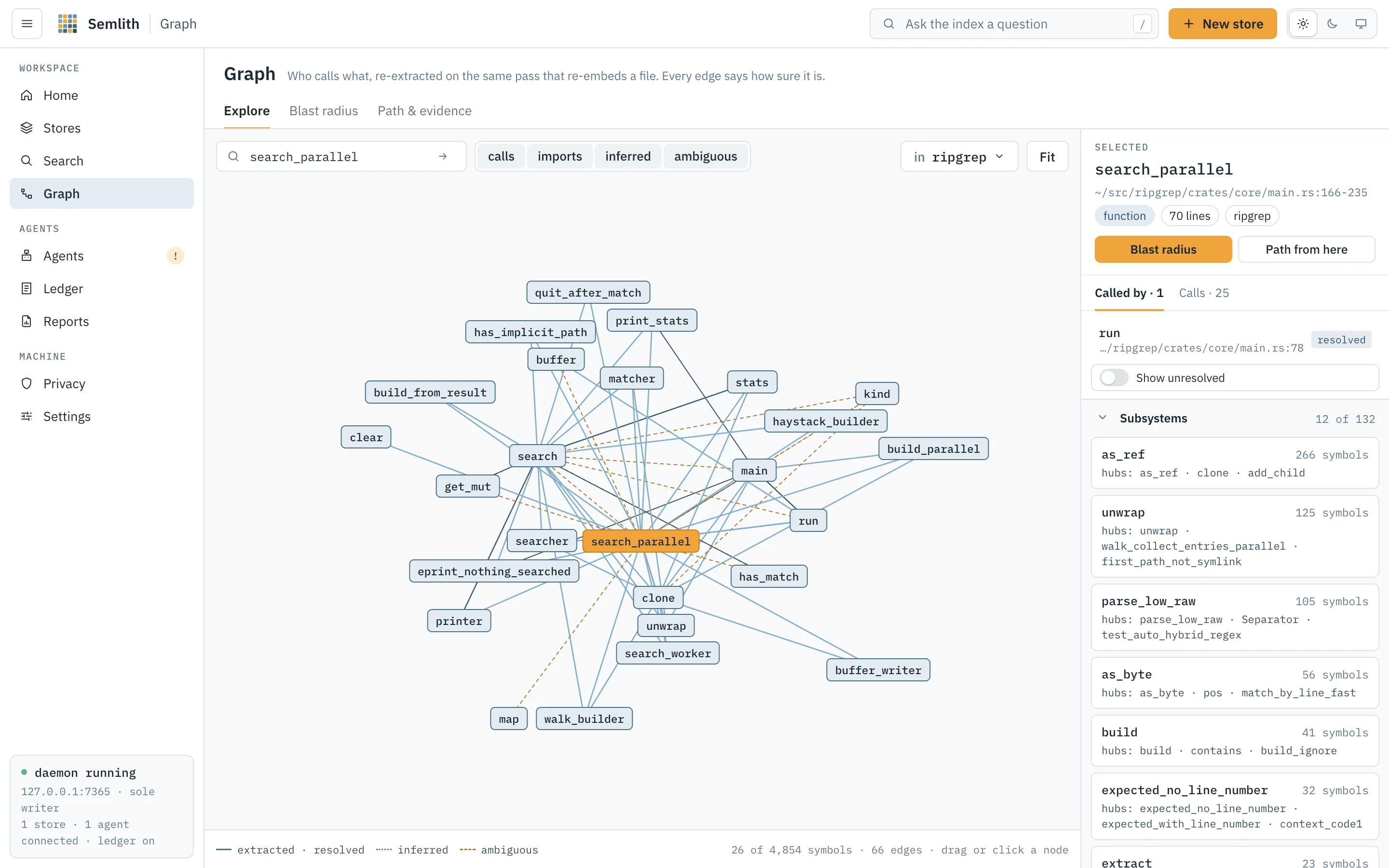
What the code says about itself: which definitions exist and which reach which. One store at a time — chosen in the toolbar — because a store’s graph is self-contained and drawing every store at once could stall the daemon. Three tabs: Explore, Blast radius, Path & evidence.
Nodes and edges
A node is a definition tree-sitter found; its kind (function, class,
struct, method, interface…) is whatever that grammar’s tags query calls it.
Every file also gets a synthetic module node spanning the whole file, so
top-level definitions and references have somewhere to belong. Markdown
headings, YAML/TOML/JSON keys, CSS selectors and HTML elements are symbols you can
find and that locators name, but never the target of an edge.
| Edge | What the source said |
|---|---|
defines | This file defines this name (module node → each top-level definition). |
contains | This definition is inside that one, e.g. a method in its class. |
calls | This code calls that name. |
imports | This file imports that name or module. |
references | This code mentions that name without calling it. |
aliases | This name stands for that one: a re-export or renamed import. |
defines and contains are structural; the other four are dependencies, and only
those are walked by a path or blast radius. An edge records the line it was written
on; when that line is unknown nothing is printed rather than a wrong one.
Confidence
| Value | Claim |
|---|---|
extracted | The file said where the target came from: a structural edge, or a call whose name or module the file also imports. |
resolved | Several definitions matched the name and ranking left exactly one. |
inferred | Matched by bare name alone. |
ambiguous | Several definitions carry the name and nothing chose; the edge carries the count. |
Treat extracted and resolved as answers, inferred as a hint and ambiguous
as a question. extracted and inferred are stored at extraction; resolved and
ambiguous are computed on every read, because indexing another definition of the
same name can change the answer. Resolution prefers a definition in the same file
(unless a module path in the call names another), then the file the source names, then a file the source imports, then a unique
definition in the corpus. A call through a receiver (x.run()) is different: it
settles only on a method of the receiver’s stated type and never on a free
function, so a receiver nothing typed is ambiguous. Ambiguous edges are drawn dashed amber and never crossed
by a walk that prefers verified edges; a chain may also only leave from the
definition it arrived at (see seam below).
Explore
Jump to a symbol centres the canvas on a name. The calls, imports,
inferred and ambiguous chips filter what is drawn, instantly; other edge
kinds are always drawn, muted. Fit frames the drawing. The force layout is
solved before the first frame; drag a node to move it, click to select, hover to
lift its edges. A view holds at most 63 symbols, captioned N of M symbols · N edges. The default symbol is a name defined once in the store with the most
resolved edges — not the busiest name, which is usually a generic one like new.
The selected-node panel gives name, file, line range, kind and store, with
Called by and Calls lists (confidence badge and edge kind on each row,
clickable). An ambiguous row reads name · N definitions and expands to every
candidate. Show unresolved lists calls no open store defines (standard library,
unindexed dependencies). Blast radius and Path from here carry the symbol to
the other tabs. Subsystems groups symbols into communities over settled calls
and imports, naming each one’s hubs.
Blast radius
Everything that reaches a symbol — what would notice if you changed it — the same
function as semlith impact and semlith_impact. Controls: the exact name;
Hops 1–6 (default 3); Verified edges only (on; never crosses a name with
several definitions); Reach.
The answer opens with a sentence — N definitions in N files reach <name> within N hops — and three figures: Reached, Files, and Inferred (rows reached
across an inferred or ambiguous edge: the unsettled part, stated beside the
settled). The table lists each definition, where it is, its hop and the edge that
reached it, filterable by name or file, hop and edge, and says how many more the
cap cut. A small reverse graph draws the answer; Files to look at groups it by
file, nearest first, with Copy list.
Path & evidence
Is there a chain from one symbol to another, and what is it made of? Controls: From, to, Swap, Prefer verified (extracted and resolved chains first), Strict (refuse names with several definitions; wins over asking for everything) and Find the path.
The answer is one sentence: connected in N hops by settled edges, or not, with how
the nearest chain got there. If any hop was matched by bare name or crosses a seam,
a banner says A hypothesis, not a finding. and Show the inferred chain walks
again without the refusal. The chain is one row per hop (name @ path:line, edge
kind, badge); a seam row marks where a hop arrives at one definition and the
next leaves from another. A count line follows: N hops · N extracted · N resolved · N inferred · N ambiguous. Supporting lines quotes, per hop, the source line
the edge was written on, read from the store.
Copy as evidence copies exactly what semlith trace --evidence prints: <from> → <to>; answer: <sentence>; one numbered line per hop, N. <from> @ <path>:<line> -> <to> @ <path>:<line> [<support class>], seams appended to the
hop they follow; then supporting lines, one per hop marked [supporting fact] or
[candidate]. No scores, no prose, nothing the store does not hold.
Agents
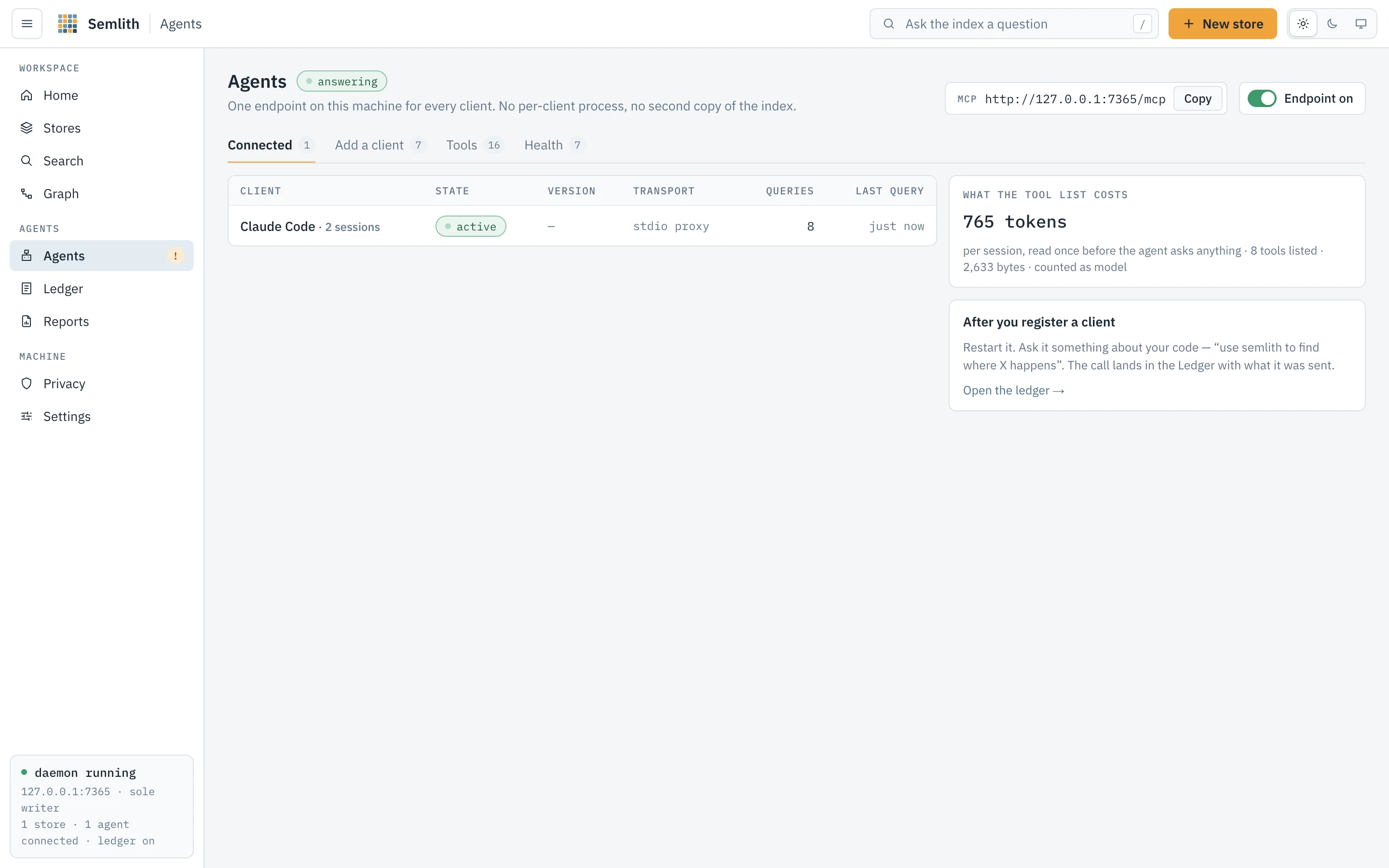
Connect agents to this daemon and see which are connected. The endpoint sits
at the top: its URL with Copy, and a switch. Off drops only the /mcp route —
stores, watcher and portal keep working — and a client gets a clear refusal, key or
not.
Connected
Clients talking to the daemon now: the name the client gives — at the MCP handshake, or on every request for a client on MCP 2026-07-28, which has no handshake (its User-Agent when it gives neither; for the stdio proxy, the app that launched it) — state, version, transport, queries and the last one. Several windows of one client are one row with their sessions counted. A stateless client’s conversation is one client, version and transport until it has been quiet for 30 minutes. What the tool list costs shows the tool list’s size in bytes and in tokens at four bytes a token — the same count the release gate asserts — paid once per session before the agent asks anything, measured from what the daemon serves now. With nothing connected, the tab says how to get a first client: register it, then restart it.
Add a client
The documented clients, grouped Terminal, Editors and Desktop, each marked found or
not and registered or not. Register / Unregister run the client’s own
command where it has one, otherwise edit its configuration file after backing it up
beside itself; Register N registers every found client. For a client semlith
cannot write to, the Config file and Terminal forms are shown to copy. The
HTTP form names ${SEMLITH_AGENT_KEY} rather than the key; the semlith mcp form
reads the key file itself. Every stanza is parsed from docs/clients.md, the same
text tests/clients.rs runs.
Tools
Every tool the endpoint serves, the question each answers (from its own definition), and its typical answer size in tokens — the median of this machine’s answers once there are five, an estimate until then.
Health
What semlith doctor prints, from the same function: per client, whether semlith is
registered and at what scope, the state of its skill, steering hook (and mode) and
rule file, and what to run to fix it. Not installed (not a fault), found, not
registered, and switched off in N folders (a directory override, named by its
directories) are kept apart. Check again re-reads. Under the table are the
machine checks from the privacy rules that carry a
reading. Registration state is read from each client’s configuration files; no
client program is run. The page reads live.
Ledger
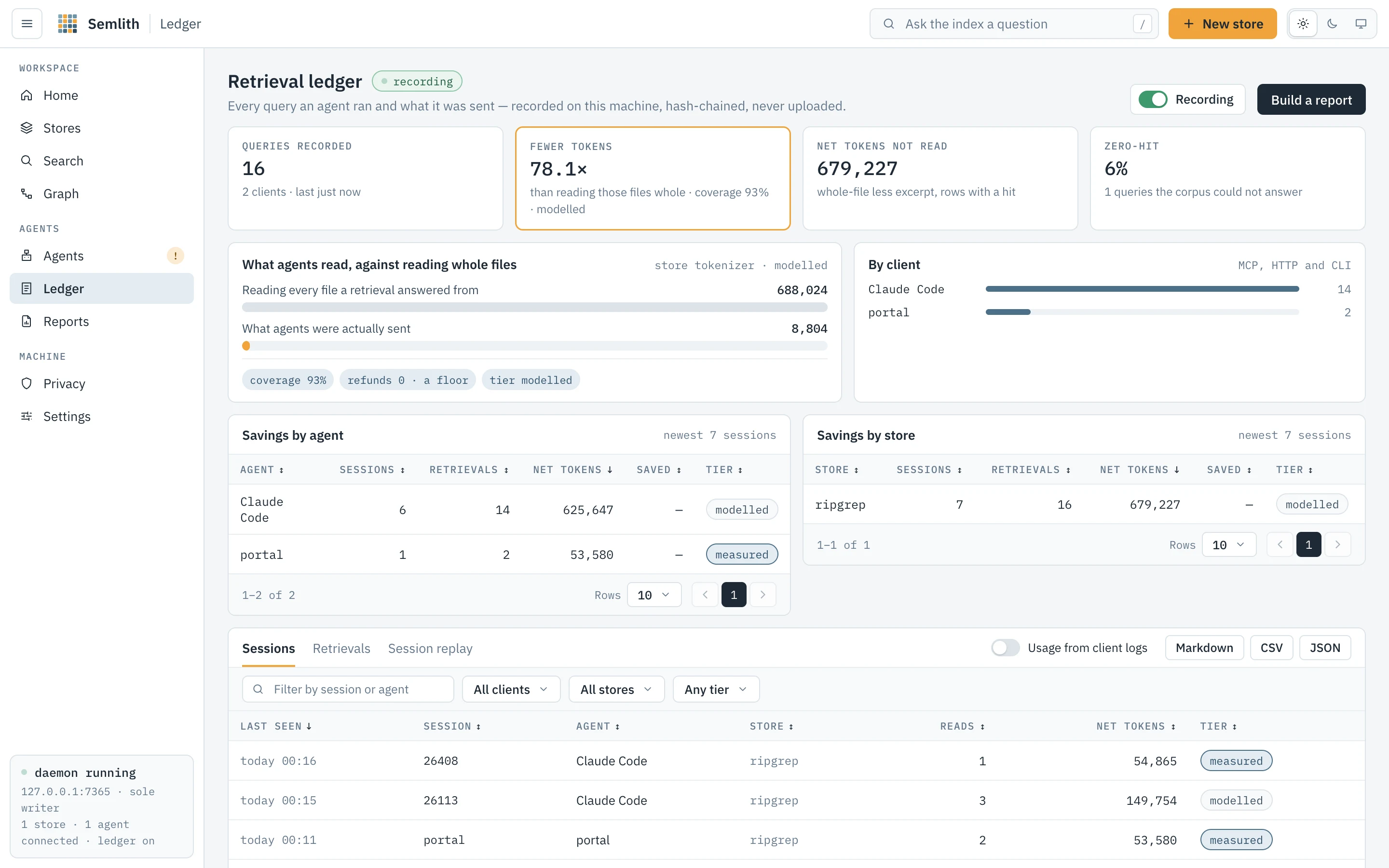
What your agents actually retrieved, recorded locally, so any saving semlith claims
has a denominator. Every surface records through one module — stdio MCP, the
daemon’s /mcp, the CLI and the portal — into a retrievals table in each store’s
own database. Nothing leaves the machine.
Recording is a switch. Off pauses writing at runtime; on again continues the
hash chain from the row before the pause. semlith start --no-ledger and
SEMLITH_LEDGER=0 turn it off for a session or a machine, and the switch says so. A
store’s own switch is on its Settings tab.
Rows are hash-chained, so an edited or deleted row is detectable. If the chain
does not verify, a banner offers Re-verify; a repair appends one note row saying
where it broke and verifies from there — no row is edited or removed.
semlith ledger --verify is the same walk.
Every figure on the page is one aggregation over the rows (ledger::figures), the
same one semlith ledger, the store cards and every report print, so a figure here
can be recomputed from the rows and from any other surface.
| Figure | Counts |
|---|---|
| Queries recorded | Agent retrievals — a search several stores answered is one — and how many clients ran them; the portal’s and the CLI’s own searches are listed beside it and not counted. |
| Fewer tokens | Whole-file tokens over excerpt tokens, over retrievals that found something, with coverage and tier. |
| Net tokens not read | Whole-file less excerpt, over the same retrievals, summed as they are. |
| Zero-hit | Share and count of retrievals nothing answered. |
- Coverage — the share of retrievals the saving is computed over; a retrieval that found nothing counts in the denominator.
- Tier —
measuredwhen every credited row was counted by the store’s tokenizer,modelledwhen any was estimated at four characters per token. - Refunds — files an agent read whole anyway: measured on clients with the steering hook, a floor elsewhere. A refund is an agent not reaching for semlith; a zero hit is semlith not reaching the answer. A refund is never a query, never in coverage, the saving, the zero hits or the gaps.
- Latency — p50 and p95 over retrievals that measured work, one figure each.
The ratio never counts a failure as a success or a row twice. The whole-file side
is what reading the file would cost: for a PDF, an Office or OpenDocument file, an
EPUB, mail, a notebook or HTML, the text the store holds for it counted like the
excerpt; for plain text, its bytes at four a token; for an image, nothing. Rows
written before 0.42.0 counted every file by its bytes and keep their numbers; the
Retrievals tab’s Tier column says which way each row was counted
(tokenizer · text, chars÷4 · bytes). The chain from 0.42.0 also covers each
row’s query id, version and basis, and its usage once filled, and records its head,
so a rewritten id or a deleted newest row fails the verify.
What agents read, against reading whole files draws the two totals; By client draws a bar per client that filters the tables below. Three tabs: Sessions (one row per conversation: client, model, reads, net tokens, and Saved at that model’s input price), Retrievals (one row per query: when, client, store, tool, query, hits, what was sent, tier; filter by store, client, Zero-hit only; its export carries every row, tool, session, version, tier and stale hits, not only the newest the page loaded) and Session replay (what an agent did after each answer — sufficed, missed, or followed by a whole-file read — read from local agent session logs). Tables sort, page, and export to Markdown, CSV and JSON.
Usage from client logs, off by default, adds each call’s model and cost from
that client’s own session log, matched by tool, time and arguments; a client whose
log cannot be read says not recorded. Cost is the client’s own figure where it
records one, otherwise tokens at the built-in models.dev price snapshot (updatable
from Reports or Settings › About). semlith ledger --usage on|off is the same
switch. Session replay is on by default (switch on Privacy) and reads local logs
only. The page reads live.
Reports
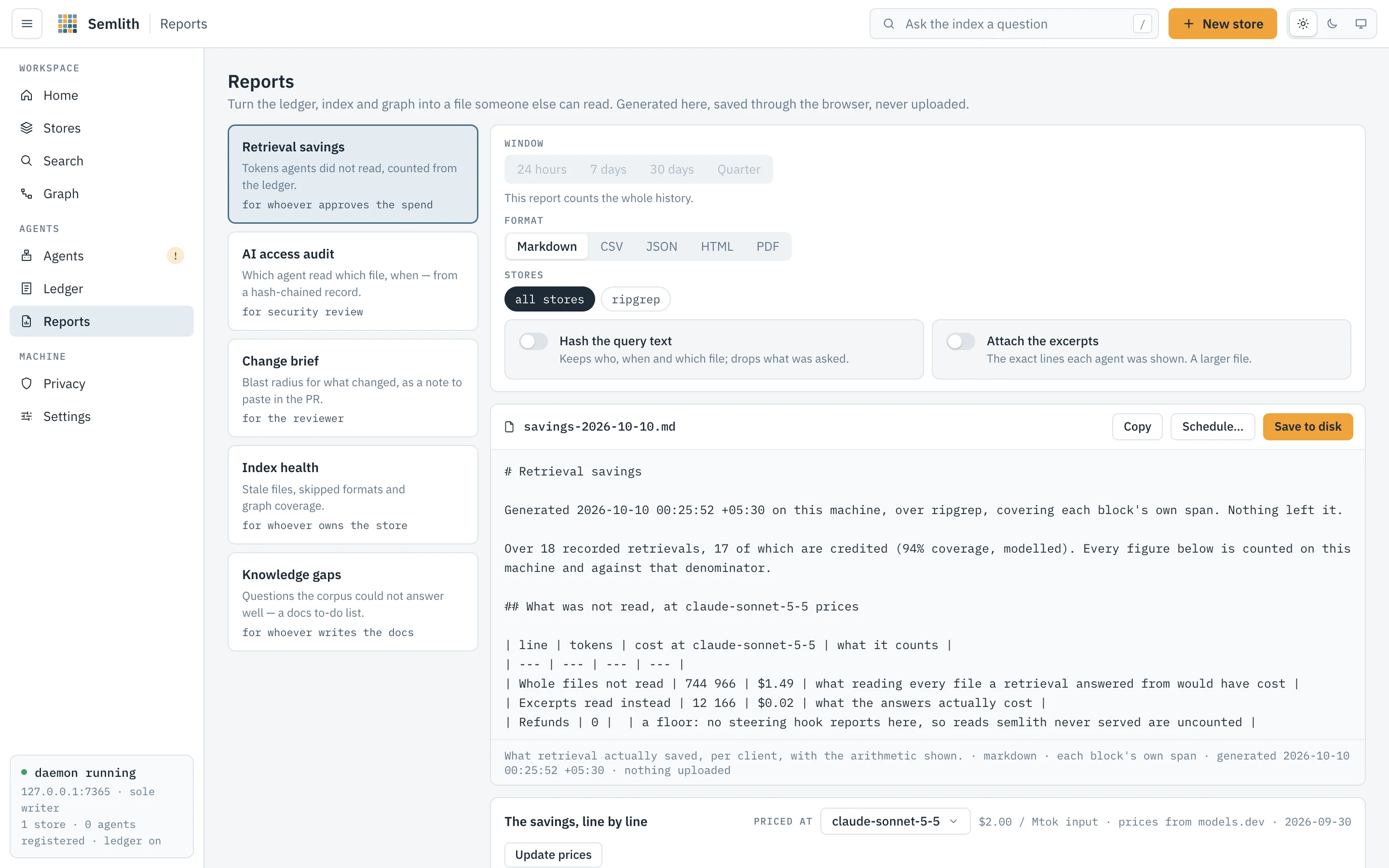
Turns the ledger, index and graph into a file for someone who will never open the
portal. Generated here, saved through the browser, never uploaded; the same
generator answers semlith report and semlith_report, byte for byte.
| Report | What it is | For |
|---|---|---|
| Retrieval savings | Tokens agents did not read, from the ledger. | whoever approves the spend |
| AI access audit | Which agent asked what, and when, from the hash-chained record. | security review and AI-use policy |
| Change brief | Files re-read, the definitions they changed, and what reaches them. | the reviewer |
| Index health | What the index holds, graph coverage, what was refused or skipped. | whoever owns the store |
| Knowledge gaps | Questions the corpus could not answer; names called and not defined. | whoever writes the docs |
Choosing a report generates it. Window (24 hours, 7 days, 30 days, Quarter;
30 days to start, the same default semlith report uses) applies to every report
but Index health, which is the index as it stands and says so; every figure of a
windowed report is counted from the rows inside the window. Format is
Markdown, CSV (a zip of one file per table), JSON, HTML or PDF, rendered by the
server (the PDF is typeset inside the binary, not printed from HTML). Stores is
all or a selection. Hash the query text replaces each query with a digest keyed
to this machine, in the access audit and the gaps report; Attach the
per-retrieval rows adds who asked, when, with which tool and what it cost to the
access audit — counts, not the lines an agent was shown, which the ledger does not
keep.
The preview is the rendered HTML report, in a sandboxed frame served from its own
route under a policy that allows no script and no network; Copy copies the
Markdown and Save to disk saves the chosen format through the browser (no
route writes a file for the page). The savings, line by line prices the
arithmetic at a model you pick, with the rate, source and date; Update prices
fetches models.dev’s table once, after asking — the only network request on this
page. Without the browser shows the semlith report command that writes the
same document, with only the flags that report reads (--scope for stores), and
semlith_report over MCP takes the same window, scope and toggles. The page never
redraws on its own: a report is a reading of a moment. What each format holds and
the JSON schema are under Formats and the JSON schema.
Schedules
A schedule is a report the daemon writes on a cadence into a directory you name.
Schedule… on the preview asks for both and keeps every option the page set —
window, stores, format, model, hashing and the attached rows; the card lists each
schedule with the file it writes, its cadence in words (any interval, down to the
one-minute floor), its last and next run and Remove schedule, and names the
schedules file the daemon reads (schedules.json in the store home). With no
daemon running they wait. Each schedule writes one file, named for its options
(semlith-savings-week.md, semlith-access-month-flask.pdf), replaced in place
each run through a temporary file and a rename, so a tracked folder shows a
readable diff and a reader never sees half a report. The daemon never creates the
directory (an unmounted volume must not be written into its mount point), never
generates two at once, and waits while a store is indexing.
semlith schedule list
semlith schedule add savings --every 604800 --to ~/Reports --format pdf --window week
semlith schedule add access --every 86400 --to ~/Reports --redact --excerpts
semlith schedule remove s1
semlith schedule set s1 off
Formats and the JSON schema
Human surfaces (the portal and semlith search) are recorded in the ledger and
counted as human searches, never as agent queries or agent saving. Refunds (a
whole-file read the steering hook saw) and rows that are not queries (notes,
refusals, accept, revoke) are never queries, coverage, zero-hit or gaps. Every
number prints through one formatter, the portal’s: 711,763, $1.42, 80%,
325.3×, 67 ms.
HTML is the reference rendering: one file, no script, no URL. IBM Plex (the portal’s own subsets, about 90 KB as base64) and both logos are embedded, the colours are the portal’s tokens read from its stylesheet, light or dark follows the reader’s system, and printing gives light A4 pages with table headers repeated. At 390 px it stacks without scrolling sideways; a wide table scrolls inside its card.
PDF is typeset by the binary to match the HTML’s print rendering: A4 (Letter when the locale is US or Canada), IBM Plex embedded as a per-document subset, a running footer with page x of y and the ledger head, a bookmark per card, Title/Author/Producer/date metadata and a tagged structure. A character Plex has no glyph for is taken from the system’s CJK fonts at render time (Hiragino, Apple SD Gothic Neo or Arial Unicode on macOS; Noto CJK, Droid Sans Fallback or WenQuanYi on Linux; Yu Gothic, MS Gothic, Microsoft YaHei or Malgun on Windows). With none installed the glyph draws as a box and the text layer still holds the character: every glyph carries a ToUnicode entry.
Markdown is built for GitHub and a PR body: a meta table, a KPI table, tables
with ---: on numeric columns, notes as quotes, tables over ten rows inside
<details>, the recompute command fenced.
CSV is data: one file per table, a header of stable snake_case keys, numbers
unformatted (711763, 1.42, 0.8), stamps ISO 8601. A report is a .zip of
<kind>-summary.csv (key,value,unit,currency,over) and one
<kind>-<table>.csv per table; semlith report --format csv --table summary (or a
table’s id) prints one.
JSON is semlith.report/2:
{
  "schema": "semlith.report/2",
  "kind": "savings", "title": "Retrieval savings",
  "audience": "for whoever approves the spend",
  "lede": "Agents on this machine asked 10 questions in the last 7 days. …",
  "generated": "2026-10-14 20:13:04 +05:30", "generated_at": "2026-10-14T20:13:04+05:30",
  "version": "0.42.0",
  "window": { "name": "week", "label": "Last 7 days", "applies": true,
              "from": "2026-10-07T20:13:04+05:30", "to": "2026-10-14T20:13:04+05:30" },
  "stores": ["flask", "ripgrep"], "redacted": false,
  "meta": [ { "label": "Ledger chain", "lines": ["46 rows · head 849df1da…81ab"],
              "chips": [ { "text": "verifies", "tone": "green" } ] } ],
  "kpis": [ { "label": "Net cost avoided", "value": 1.423526, "unit": "money",
              "currency": "USD", "over": "at claude-sonnet-5-5 input price",
              "display": "$1.42", "lead": false } ],
  "blocks": [
    { "block": "table", "id": "not_read", "title": "What was not read", "meta": "…",
      "columns": [ { "key": "line", "label": "Line", "kind": "strong" },
                   { "key": "tokens", "label": "Tokens", "kind": "num" },
                   { "key": "cost_usd", "label": "Cost", "kind": "num" } ],
      "rows": [ ["Whole files not read", 713944, 1.427888] ],
      "total": ["Net not read", 711763, 1.423526], "note": "…", "empty": "…" },
    { "block": "facts", "title": "Counted alongside", "meta": "…",
      "facts": [ { "label": "Latency p50", "value": 67.0, "unit": "ms",
                   "over": "over 10 queries in the window", "display": "67 ms" } ] },
    { "block": "note", "text": "…" },
    { "block": "code", "title": "Recompute it", "meta": "…", "comment": "…",
      "lines": ["semlith report savings --window week --model claude-sonnet-5-5"] }
  ],
  "chain": { "state": "verifies", "rows": 46, "head": "k1:849df1da…" }
}
A figure (a KPI or a fact) is value (a number; a string for a word such as a
tier; null when there is nothing to divide by), unit (tokens, queries,
files, sessions, definitions, names, stores, bytes, ms, ratio from
0 to 1, times, money, text), currency (with money only), over and
display (what a person saw). A table has typed columns — a stable
snake_case key carrying its unit, and a kind of text, strong, muted,
id, num or bar — and rows of raw values in column order: numbers as
numbers, shares as ratios, stamps as ISO 8601, nothing as null; more counts
rows not listed. window.applies is false for health and from is absent for
all; chain (verifies, broken or empty) is absent from reports that do not
read the ledger. semlith.report/1 (0.27.0 to 0.41.0) held display strings in
untyped blocks and is no longer produced.
Privacy
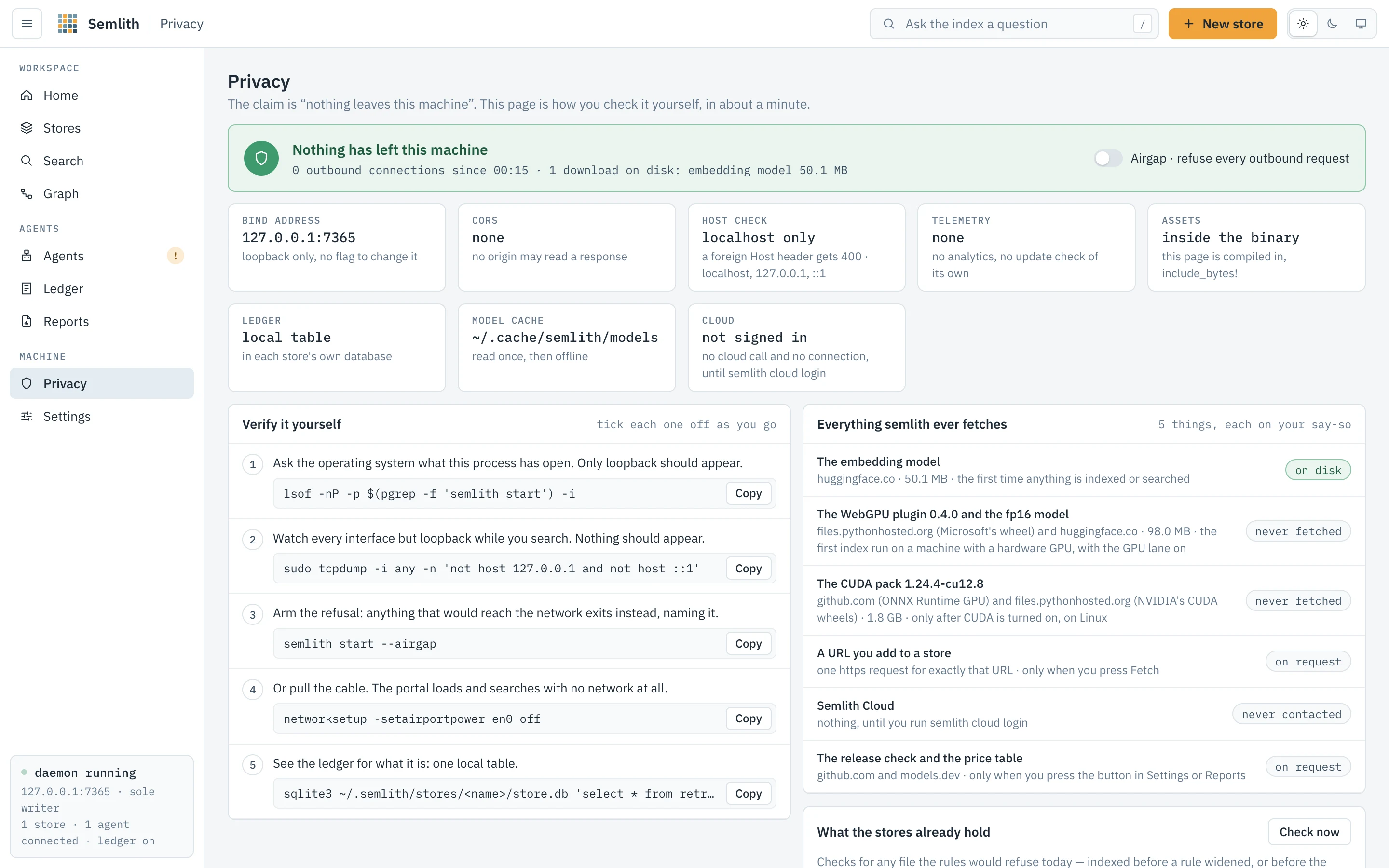
Check the claim that nothing leaves this machine instead of believing it.
The verdict counts outbound connections since the daemon started, from a
counter on every outbound request. Airgap, beside it, makes any outbound
request exit and name what it would have fetched; when the daemon was started with
--airgap or SEMLITH_AIRGAP the switch says so and stays on.
The facts — bind address (loopback only), CORS (none), host check (foreign
Host gets 400), telemetry (none), assets (compiled into the binary), the ledger
(a local table per store), the model cache, and Cloud (not contacted until semlith cloud login).
Verify it yourself — five copyable steps you tick off: list what the process
has open (lsof; only loopback should appear); watch every other interface while
you search (tcpdump; nothing should appear); arm the refusal with semlith start --airgap; pull the cable and search anyway; read the ledger table with sqlite3.
Everything semlith ever fetches — each download with its source, size, trigger
and whether it is cached: the embedding model (once, on the first run), the WebGPU
plugin and fp16 model, the CUDA pack (only after its lane is turned on), a URL you
add (one request, when you press Fetch), Semlith Cloud (nothing until you sign in),
and the release check and price table (github.com and models.dev, only when you
press the button). Below them, every file semlith add has fetched into a store’s
downloads/ folder, with the host it came from and its size. Airgap refuses all of
them unless already cached.
What the stores already hold runs today’s refusal rules backwards: Check
now applies the deny-list to each file’s name and the credential shapes to its
stored text, across every open store, to find files taken in before a rule widened
— the same Semlith::scan as semlith scan. Rows show store, path and reason,
never the matched text; Forget drops a file’s chunks. There is no MCP tool for
this: an agent does not decide what a store may hold.
Session replay switches the Ledger’s replay tab, which reads local agent session logs and keeps nothing else.
Rules the binary enforces
Each row is a rule and what this daemon found when it checked — a path, a file
mode, a count. A failing row carries the command that repairs it and, where safe, a
Repair button. Safe means the repair narrows access, is idempotent, touches
only a path semlith owns, and is confirmed by re-running the check; it reports what
changed and what it was (0700, was 0755). It calls the same engine as semlith doctor --fix. The rules include: a person may decide on refused files in bulk and
an agent never may; ledger recording can be paused at runtime; session replay is on
by default. The page reads live, so a chmod in a terminal turns a row without a
reload.
Settings
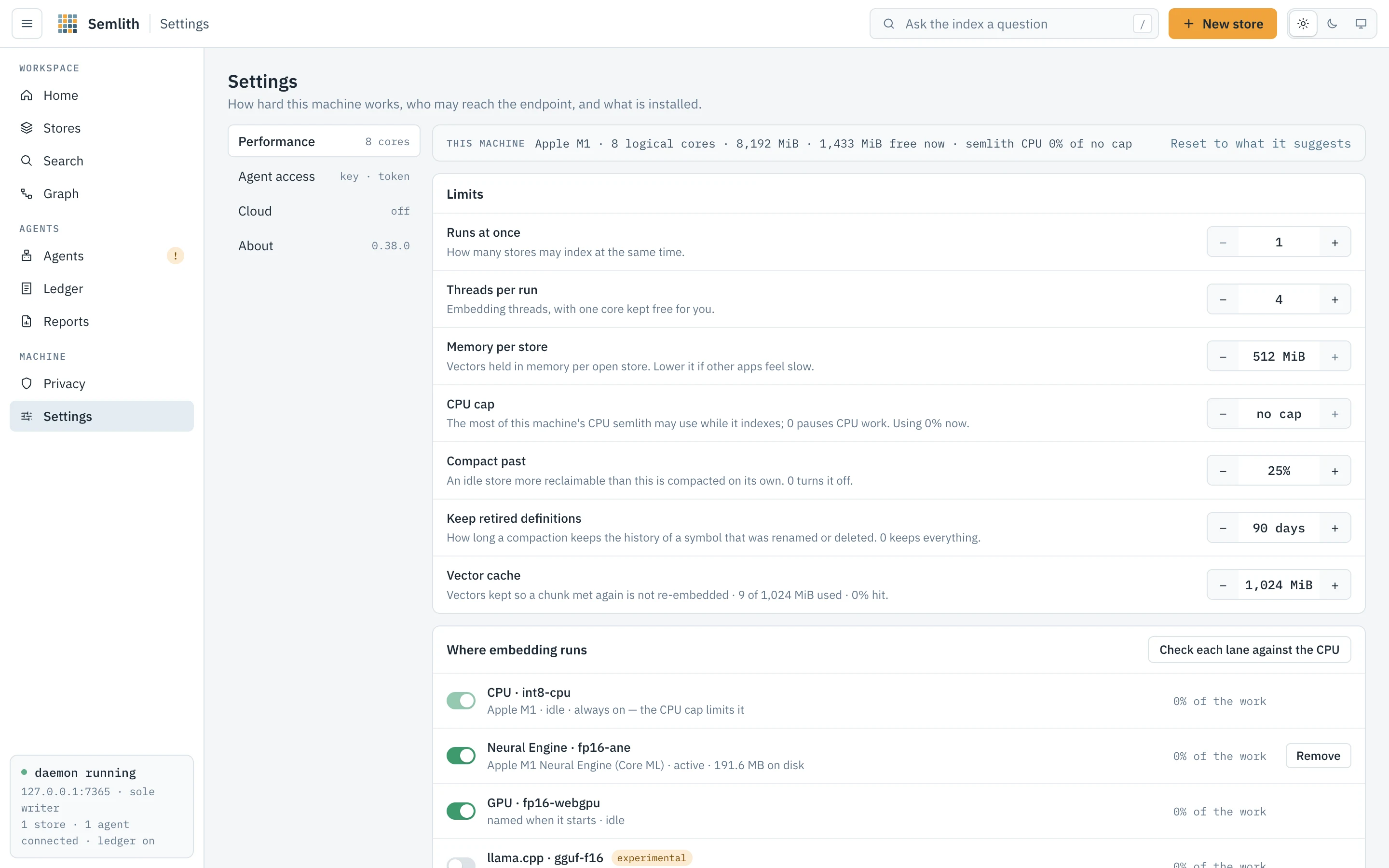
How hard this machine works, who may reach the endpoint, and what is installed, in four sections.
Performance
This machine shows logical cores, total and free memory, and semlith’s own CPU use, read on every request; Reset to what it suggests restores every limit.
| Limit | What it is |
|---|---|
| Runs at once | Stores that may index at the same time: free memory less a 2 GiB reserve over one run’s peak, capped by the cores with one kept free. |
| Threads per run | Embedding threads, with one core kept free. |
| Memory per store | Vectors held in memory per open store. |
| CPU cap | The most CPU semlith’s process may use while indexing, 0–100 % of all cores, in steps of 5; 100 is no cap, 0 pauses CPU work (the run card says so). A value off the grid snaps onto it. |
| Compact past | Reclaimable share above which an idle store compacts itself; 0 turns it off. |
| Keep retired definitions | How long compaction keeps the history of renamed or deleted symbols; 0 keeps all. |
| Vector cache | Vectors kept so a chunk met again is not re-embedded, with use and hit rate; 0 turns it off. |
The route enforces the same ceilings as the page (the core count for parallelism,
free memory less the reserve for memory). Saved values apply at once to running
work and live in ~/.semlith/settings.json. A value set by SEMLITH_INDEX_PARALLEL,
SEMLITH_EMBED_THREADS, SEMLITH_INDEX_MEMORY, SEMLITH_VECTOR_CACHE_MB or
SEMLITH_CPU_CAP is shown and locked.
Where embedding runs has a switch per lane — CPU, Neural Engine, GPU, CUDA,
TensorRT for RTX, OpenVINO, llama.cpp — with its device, variant, state (active,
idle, starting, compiling or downloading with progress, unavailable or
failed with the reason) and live share of the work. The last four are
experimental: built and checked without their hardware. A lane whose pack is
missing asks before downloading, naming the size. It is the same control as
semlith accel.
The CPU lane is always on (its switch is locked; the CPU cap holds it back). A lane
set by SEMLITH_ACCEL says so and is locked. Which lanes can run is read from the
hardware: no usable GPU (Metal, or a vendor Vulkan driver) disables the GPU and
llama.cpp lanes; no NVIDIA card and driver disables CUDA and TensorRT; a non-Intel
CPU disables OpenVINO. An unavailable or failed lane can be switched off, never on,
and the refusal says why. On a Mac the GPU does not embed beside the Neural Engine
unless gpu-beside-ane is on.
Check each lane against the CPU is semlith doctor --gpu: each lane embeds 32
fixed chunks, compared with CPU vectors committed to the repository, showing the
lowest cosine and the rate.
Agent access
- Agent key — the credential HTTP clients carry; masked until Reveal.
Rotate mints a new one; the old one keeps working for a grace window. Clients
that launch
semlith mcpread the key file and need no change. - Session token — the portal’s, shown truncated, with Rotate; this tab moves to the new token, other tabs must reopen the printed URL.
- Start at login — installs or removes the login service (launchd user agent,
systemd user unit, Windows logon task), showing its mechanism, definition file and
last start. Removing asks first: after a reboot agents cannot reach semlith until
someone runs
semlith start.
See The two credentials.
Cloud
Not signed in: one sentence on the two products (“Semlith runs on your machine
and is free. Semlith Cloud is the paid, hosted version. It keeps one index that
every agent can reach, on any laptop, in the cloud or in CI, for you alone or your
whole team.”), a line saying this binary works without it and contacts nothing
until you sign in, and the two commands to copy, semlith cloud login <org> and
semlith cloud connect <org>. In this state nothing in the
daemon contacts any host; it only checks for ~/.semlith/cloud.json.
Signed in: per org, its name, plan, the token’s 13-character prefix (never the
token) and Disconnect (removes its remote stores and forgets its token here); a
reachability pill (connected, unreachable, refused) with the reason, read from
/api/cloud/status when opened and on Check again — the one request this page
makes to the host; and a card per remote store with its state, files, chunks, each
source’s revision and lag, and a folder field with Push (semlith cloud push).
Below them, every store the host’s answer lists that this machine has not
connected is named <org>/<store> with a not connected here pill, its state,
files and chunks — a store the org added after this machine connected, or every
store when none is. Sync new stores adds them (semlith cloud connect <org>,
add only: a store the cloud no longer offers stays until Disconnect) and toasts how
many were new. While the host is checking, unreachable or refused, nothing is
flagged. semlith cloud status says the same, connected here or not connected here on each store line.
Ledger sync has a switch per local store (semlith cloud sync <store> on|off), off by default, with the last send. What leaves this machine lists
each kind of request and what it carries. Reports and replay fetches a cloud
report (semlith cloud report) or sends one transcript you pick (semlith cloud replay), after a confirmation. Remote stores also appear on Stores and in Search’s
store picker with a remote · <org> badge, and their hits merge into search results
by score. The Stores page’s Remote stores card points here for stores added in the
cloud later; it makes no cloud request itself.
About
The running binary’s version and store format, path, size and target, bind address, store home, source licence, uptime, process id and the MCP revisions it speaks.
- Updates — semlith never checks on its own. Check for updates asks
github.com once; Install <version> downloads and replaces the binary after
asking (the running daemon keeps the old one until restarted). It is
semlith upgrade. - Prices — the price table behind every cost and savings figure; Update
prices is
semlith prices update. - First-run screen — opens Welcome again; nothing is deleted.
Languages lists every name --lang accepts, marked where the graph is
extracted too; search and graph read the same table. The list of embedding models is
deliberately not shown — semlith models and GET /api/models give it — the one
capability with no portal view, recorded in tests/portal.rs and
docs/compatibility.md.
Concepts
Store, root, file, chunk
A store is a corpus: one vector index and one SQLite database that must agree. A root is a directory a store covers; a store can have several. A file is one file semlith read. A chunk is a piece of it — the unit embedded, searched and returned. Chunks overlap slightly, so a span is stitched together by line number.
Symbol and edge
A symbol is a definition tree-sitter found, plus one module node per file. An
edge is something one piece of source said about another, of six kinds. An edge
belongs to its source file and is replaced with it; its target is a name, resolved
at query time. That is what makes the graph safe to re-index: symbol ids change on
every re-extraction, so an id-valued target would orphan edges from other files.
Resolving by name keeps every edge as current as both ends, and still records edges
to code that was never indexed. There is no semlith graph build: extraction runs in
the same pass that re-embeds a changed file.
Locator
An answer that says where, not what: path, line span, enclosing symbol and kind, the lists that found it, freshness and one line of text. The first stage of locate, then read — what keeps an answer cheap.
Freshness
A hit is fresh when its file still has the size and modification time it had when
indexed, stale otherwise. A stale span is still served, marked as what semlith read
before the file changed.
The two credentials
Each has a different reach, and neither can do the other’s job.
The session token belongs to the portal. It is generated at daemon start, held
in memory for that run, and opens the page and every /api/* route. It reaches the
browser once, in the printed URL, then travels in a Semlith-Token header. It is
shown truncated everywhere; only the response that rotates it carries it whole.
Rotating takes effect at once: the rotating page gets the new value and every other
holder of the old one stops. No client configuration carries it.
The agent key belongs to agents: sml_ followed by 64 hex characters from the
OS random source, stored in agent.key under the store home, created on first read
and never reminted implicitly. It opens /mcp and nothing else (a test asserts no
other route accepts it). It is persisted because client configuration is written
once and must survive restarts, upgrades and token rotations. The page receives it
only in the response to Reveal.
Rotating the key does not cut off an agent mid-session: the new key works at once and the old one is still accepted for fifteen minutes or until the daemon exits, whichever comes first. Configuration files on this machine that held the old key are rewritten and named; anything configured elsewhere needs the new stanza before the window closes.
ChatGPT desktop (the Codex app)
How to connect ChatGPT desktop (the Codex app) to Semlith over MCP, the command or file that adds it, and how to check the connection works.
Security
What can talk to Semlith, what a leaked agent key gets, how secrets in files are refused, and what leaves the machine when an agent searches.